Technology Selection: Zero-Hardware Smartphone Scanning vs Legacy Hardware Terminals
June 30, 2026 in Cashless Event Payments — Use Cases
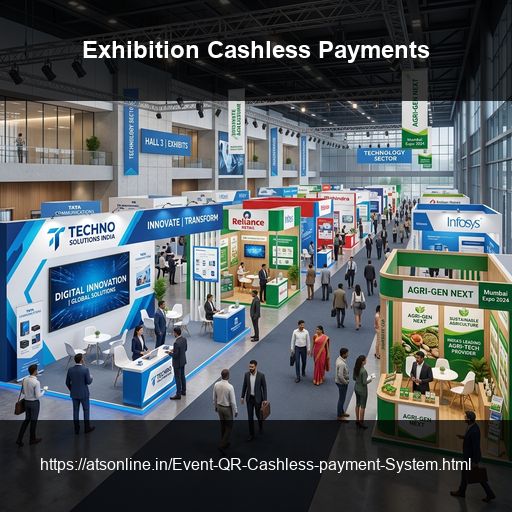
For exhibitions and trade shows in India, WalletQrPay delivers a fully functional cashless payment system across 50 to 200+ stalls in under 30 minutes — with zero hardware, no proprietary terminals, and automated per-exhibitor settlement reports at close of show. Exhibitors use their own smartphones as payment devices. Visitors receive a QR wallet at entry and pay at any stall with a single scan. The organizer monitors every stall's revenue in real time from a central cloud dashboard.
This post is for exhibition organizers who are running events at venues like Pragati Maidan, India Expo Centre, Bombay Exhibition Centre, or any consumer or trade expo across India — and who need a cashless payment solution that deploys as fast as the exhibition itself is set up.
The Exhibition Payment Challenge: Scale, Speed, and Independence
Exhibitions are unlike food festivals or nightclubs in one critical respect: the vendors are not your employees. They are independent exhibitors — businesses, brands, artisans, and traders — who have paid for their stall space and have their own way of doing things. Any payment system you introduce must work on their terms: minimal training, zero hardware burden, and no disruption to their existing business practices.
This creates three specific challenges that no exhibition organizer has fully solved with legacy payment methods:
Challenge 1: Scale at Speed
A large consumer exhibition at Pragati Maidan or India Expo Centre can have 150 to 500 stalls across multiple halls. Setting up a payment system at that scale in the hours available before doors open is a genuine logistical problem. RFID deployments at this scale require hardware to be transported, placed, powered, range-tested, and calibrated at every stall — a process that often begins the night before and still runs past opening time. POS terminal deployments require device logistics, SIM card management, and staff training for each unit.
WalletQrPay deploys at any scale in under 30 minutes because there is no hardware. Each exhibitor installs an app on their own phone. The organizer activates the event session from a laptop. That is the entire deployment.
Challenge 2: Exhibitor Independence
Exhibition organizers cannot mandate what devices exhibitors use, cannot require them to purchase or rent equipment, and cannot assume technical expertise beyond smartphone use. A payment system that requires exhibitors to manage proprietary hardware or learn complex software will face resistance, non-compliance, and support burden that overwhelms the organizer's team on show day.
WalletQrPay's vendor app runs on any standard smartphone. Setup for each exhibitor is a 5-minute orientation covering app installation, login, and one test scan. After that, the exhibitor is self-sufficient.
Challenge 3: Post-Show Settlement Across Hundreds of Independent Stalls
When 200 independent exhibitors each need to be paid out accurately at the end of a 5-day show, the post-event settlement process becomes the most operationally demanding activity of the entire exhibition — often rivalling the setup itself in time and complexity. Cash-based settlements require every stall's cash collection to be physically counted and reconciled. POS terminal-based settlements require downloading logs from every device individually. Both processes generate disputes that take days to resolve.
WalletQrPay generates an automated per-exhibitor settlement report from the cloud audit log — available for every stall simultaneously, within minutes of show close. Each exhibitor's total sales, transaction count, and time-wise breakdown are ready before the last attendee has left the building.
How WalletQrPay Handles Large-Scale Exhibitions
WalletQrPay's architecture is inherently suited to the exhibition format because it is software-defined — adding more exhibitors to the system means generating one more set of credentials and orienting one more stall operator, not deploying one more piece of hardware.
Each exhibitor in a WalletQrPay exhibition deployment operates as an independent merchant session in the cloud. All sessions run in parallel, so 200 stalls processing transactions simultaneously creates no performance issue. The organizer's dashboard aggregates all sessions in real time while keeping each exhibitor's data private to themselves.
What the organizer sees: Total event revenue, per-stall sales in real time, transaction counts per hall or zone, top-up volume and pace, and any stall showing as offline or inactive.
What the exhibitor sees: Their own stall's transaction count, running sales total, and transaction history. They cannot see any other stall's data.
What the visitor sees: One QR wallet that works at every stall in the exhibition, regardless of which hall or zone the stall is in. One top-up, valid everywhere.
Setting Up: 30-Minute Deployment Across 50+ Stalls
The speed of WalletQrPay's exhibition deployment is its most frequently cited advantage by organizers who have switched from legacy systems. Here is what the 30-minute window actually covers:
Before Show Day (2 Weeks Out)
The preparation that enables a 30-minute deployment begins two weeks before the event. ATS Online configures the exhibition account, generates individual vendor credentials for each stall, and provides the exhibitor orientation materials.
Exhibitors receive their credentials in advance — typically via WhatsApp — and are asked to install the WalletQrPay vendor app before show day. For large exhibitions, a group orientation session (in person or via video call) covers the scanning flow, menu setup, and troubleshooting basics. Most exhibitors complete this in 10 minutes or less.
Setup Morning (Under 30 Minutes)
On setup morning, the organizer's payment team completes the following:
Entry counter activation — one or two phones or tablets set up with the WalletQrPay wallet issuance interface and (if using printed QR slips) connected to a standard receipt printer. Test issuance confirmed. This takes under 10 minutes.
Top-up station activation — designated top-up stations (typically 2 to 6, depending on expected footfall) are configured and tested with a UPI and cash test transaction. This takes under 10 minutes.
Organizer dashboard confirmation — the event session is activated on the cloud dashboard, all stalls are confirmed as registered, and a test transaction is run to confirm end-to-end connectivity. This takes under 5 minutes.
Exhibitor readiness check — a fast walk-through or group WhatsApp confirmation confirms which exhibitors are live on the app and which need last-minute assistance. Individual stalls needing help are handled in 5 minutes each.
The entire operational deployment — not including the two-week preparation — is under 30 minutes.
For Exhibitions with Late-Joining or Walk-In Exhibitors
Exhibitions frequently have exhibitors who join late, fill cancelled stalls at the last minute, or change booth assignments on setup morning. WalletQrPay handles this cleanly: a new exhibitor account is created from the organizer dashboard in under 2 minutes, credentials are sent to the exhibitor's phone via WhatsApp, and they are live on the system before their stall is fully set up.
No hardware needs to be dispatched. No device needs to be reconfigured. The system adapts in real time.
Attendee Experience at Exhibitions: Seamless from Entry to Last Stall
The visitor experience at a WalletQrPay-powered exhibition is designed to be familiar, fast, and frictionless — which matters because exhibition visitors are not a captive audience. A confusing or slow payment process at the entry gate creates a negative first impression that colours the visitor's entire experience.
At the Entry Gate
Visitors arrive at the exhibition entry counter and receive their QR wallet. For pre-registered visitors (those who purchased tickets online or pre-registered for the show), wallets can be assigned before arrival and delivered via WhatsApp — so they enter the exhibition with their wallet already ready. For walk-in visitors, the QR is issued at the entry counter via printed slip or mobile send in under 30 seconds.
For large exhibitions with multiple entry gates, WalletQrPay supports simultaneous issuance from multiple entry devices under the same event session — all wallets are active across the entire exhibition floor from the moment of issuance.
At Top-Up Counters
Top-up stations are positioned near the entry zone — ideally within the first 30 to 50 metres of the exhibition floor, before visitors reach the first stalls. Visitors load their wallet using UPI (the most common method at Indian exhibitions, where smartphone penetration among visitors is near-universal), card, or cash.
For multi-day exhibitions, visitors who return on subsequent days do not need to be issued a new wallet — their existing QR remains active and their balance carries over. They can proceed directly to top-up if needed, bypassing the entry issuance counter.
At Exhibitor Stalls
Payment at each stall is a 3-step interaction: the visitor selects what they want, shows their QR, the exhibitor scans and confirms. Under 5 seconds. The visitor's wallet balance updates in real time. The exhibitor sees the transaction on their device screen. No cash changes hands, no receipt needs to be printed, and no change needs to be given.
For exhibitions with a mix of retail, F&B, and service stalls, a single QR wallet covers all transaction types without any configuration change. The visitor pays for a saree at one stall, a craft item at another, and a snack at the food court — all from the same wallet.
Balance Check and Top-Up on the Floor
Visitors who want to check their balance can scan their own QR with their personal phone camera at any time — the live balance appears immediately. If they need to top up, they can return to a top-up station or, if the organizer has enabled it, top up directly at any exhibitor device that supports top-up mode.
At the Exit
Unspent wallet balances are refunded at the exit counter — instantly via UPI, or as cash from the exit float. For multi-day exhibitions, visitors who plan to return the next day are advised to retain their QR and unspent balance rather than refunding and re-topping the next morning.
Exhibitor Dashboard: Real-Time Sales Visibility per Stall
One of WalletQrPay's most valued features among exhibition exhibitors — as distinct from the organizer — is the individual stall dashboard. Each exhibitor can see their own sales data in real time from the vendor app on their phone.
What each exhibitor sees in their app: - Running total sales for the current session - Transaction count (number of payments processed) - Transaction history (time, amount, and confirmation code for each sale) - Current session status (active, paused, or closed)
This gives exhibitors something that no cash-based or manual POS system provides during an active show: a live view of their own revenue accumulation. For multi-day exhibitions, exhibitors can see day-by-day totals and identify their peak hours and best-selling periods.
What the organizer sees across all stalls: - Per-stall sales ranked by revenue (identifies top and bottom performers in real time) - Hall-by-hall or zone-by-zone revenue breakdown (for exhibitions organised across multiple halls) - Stall-level connectivity status (any exhibitor whose device has gone offline) - Total event revenue, top-up volume, and refund volume updated in real time
For exhibition organizers who need to brief sponsors, report to venue management, or update media partners on footfall and commerce data during a live show, the dashboard provides the numbers in real time rather than waiting for a post-event report.
End-of-Show Settlement: Automated Payouts, Zero Disputes
Post-exhibition settlement is where WalletQrPay delivers its most concrete time and cost saving. Consider what manual settlement looks like at a large exhibition:
- 200 exhibitors each hand over their cash collection
- Organizer's team counts each stall's cash separately
- Each count is reconciled against the exhibitor's declared sales
- Discrepancies are negotiated (and frequently disputed)
- The process runs for 6 to 10 hours after show close
- Multiple rounds of recounting and re-discussion follow
With WalletQrPay, settlement at close of a 5-day exhibition looks like this:
- The event session is closed from the organizer dashboard
- Per-exhibitor settlement reports are generated automatically — one for each stall, simultaneously
- Each report shows: total transaction count, total sales value, day-by-day breakdown, and average transaction value
- The master settlement report aggregates all stalls into a single financial summary for the organizer
- Payout amounts are distributed to each exhibitor via bank transfer or UPI based on the report
The entire process — from session close to payout initiation — takes under 30 minutes. Disputes are eliminated because the settlement figures come from the cloud audit log, not from exhibitor declarations or physical cash counts.
For multi-day exhibitions, the organizer can generate and process daily settlement reports at end of each show day rather than waiting for final close — which allows exhibitors who have already completed their final-day inventory to be paid out before the show officially ends.
How WalletQrPay Compares to Older Exhibition Payment Methods
| Feature | WalletQrPay (QR) | RFID / NFC Cards | Dedicated POS Terminals | Cash / Manual |
|---|---|---|---|---|
| Hardware required | None — exhibitor's own phone | Card readers at every stall | Terminal per stall | None |
| Setup time (100 stalls) | Under 30 minutes | 4–8 hours | 3–6 hours | Immediate but fraud-prone |
| Exhibitor onboarding | 5-minute app orientation | Reader training required | Terminal training required | No training needed |
| Late exhibitor addition | 2 minutes (new credentials) | New reader must be deployed | New terminal must be delivered | Instant |
| Real-time organizer visibility | Complete, all stalls, live | Partial (requires reader sync) | Partial (requires terminal sync) | None |
| Post-show settlement | Automated, minutes | Requires sync and processing | Requires download per terminal | Manual, hours, disputed |
| Exhibitor settlement report | Automated per stall | Requires system export | Requires terminal download | Exhibitor declaration only |
| Visitor experience | UPI-native, familiar | Tap (less familiar in India) | Card/PIN (slowest) | Cash (familiar but slow) |
The comparison is not close for the vast majority of Indian exhibition formats. RFID and POS terminal deployments were designed for permanent or long-duration installations where hardware logistics and training costs can be amortised. For the 1 to 7-day exhibition format that dominates the Indian trade and consumer show calendar, WalletQrPay's zero-hardware, instant-setup model is the only economically and operationally rational choice.
Frequently Asked Questions
Can exhibitors use their own phones as POS devices?
Yes — this is the core design principle of WalletQrPay for exhibitions. Every exhibitor uses their own smartphone, running the WalletQrPay vendor app, as their payment device. There is no additional hardware required. The phone's built-in camera handles QR scanning. Any Android or iOS smartphone from the last 5 years is compatible.
What happens if an exhibitor's phone battery dies during the show?
If the exhibitor has a backup phone, they can install the vendor app and log in with their stall credentials — the cloud session transfers seamlessly and transaction history is retained. If no backup phone is available, the organizer can temporarily designate a spare device from the event team for that stall. Because the system is cloud-native, no locally stored data is at risk. Once the original device is charged and reconnected, it rejoins the session immediately.
Can a stall have two devices scanning simultaneously — for example, if they have a busy counter?
Yes. Multiple devices can be logged into the same stall session simultaneously. A stall that deploys two phones — one for ordering and one for payment — sees all transactions aggregated under their single stall account in the dashboard. This is particularly useful for high-volume stalls with long queues.
How does WalletQrPay handle multi-hall exhibitions where halls are in different buildings?
Each hall or zone can be configured as a separate section within the event session, or all stalls can operate under a single unified session. The visitor's QR wallet works across all halls regardless of configuration. The organizer can filter the dashboard by hall to see zone-specific performance data.
Can WalletQrPay be used at exhibitions that also have paid entry ticketing?
Yes. WalletQrPay handles F&B and retail payments within the exhibition independently of the entry ticketing system. For exhibitions where WalletQrPay is deployed alongside EventGateTicket (ATS Online's online ticketing platform), the two systems can be integrated so that a visitor's entry ticket scan also triggers their QR wallet issuance — creating a fully unified cashless entry and payment experience.
What internet connectivity is required at the exhibition venue?
WalletQrPay requires active internet connectivity at all devices — entry counters, top-up stations, and exhibitor stalls. For exhibitions at major Indian convention centres (Pragati Maidan, India Expo Centre Greater Noida, IEML, Bombay Exhibition Centre, BIEC Bengaluru), venue wifi or strong 4G coverage is standard. For outdoor exhibition formats or temporary pavilion structures, portable 4G hotspots are recommended as a connectivity backup. ATS Online advises on connectivity requirements during event setup planning.
How does an exhibitor know their sales data is accurate and has not been altered?
WalletQrPay's transaction records are written to an immutable cloud audit log at the moment of each transaction. Neither the organizer nor the exhibitor can edit, delete, or alter logged transactions. The settlement report is generated directly from this audit log — the same data that both parties can view independently. This creates a neutral, tamper-proof financial record that serves as the single source of truth for all settlements.
Ready to Go Cashless at Your Exhibition?
ATS Online has deployed WalletQrPay at consumer exhibitions, trade shows, and expo events across Delhi NCR, Mumbai, and other Indian cities. The team handles account setup, exhibitor credential generation, on-day deployment support, and post-show settlement.
Or call us directly at: +91-9810078010
Conclusion
By moving to a secure, software-defined QR cashless wallet setup, organizers and businesses protect their event margins, eliminate manual reconciliation delays, and deliver a frictionless transaction experience aligned with India's UPI-first payment behaviors.
Switch to UPI-native QR payments and protect your margins. Visit www.atsonline.in, call us at +91-9810078010, or email ats.fnb@gmail.com to explore WalletQrPay.