Finance & Settlement Operations: Streamlining Multi-Vendor Payouts with Digital Audit Logs
June 30, 2026 in Cashless Event Payments — Features
Automated vendor settlement at a cashless event means that every vendor's total sales, transaction count, and payout amount are generated directly from a system-recorded audit log — not from a vendor's self-declaration or a manual cash count. With WalletQrPay, this report is available within minutes of an event closing, for every vendor simultaneously, with no possibility of dispute because the figures come from the same transaction record both the organizer and the vendor can independently verify.
This post explains exactly how that process works — what the settlement report contains, how payouts are processed, and why this single feature is often the reason event organizers cite for switching to cashless in the first place.
The Settlement Nightmare: Why Cash Events End in Disputes
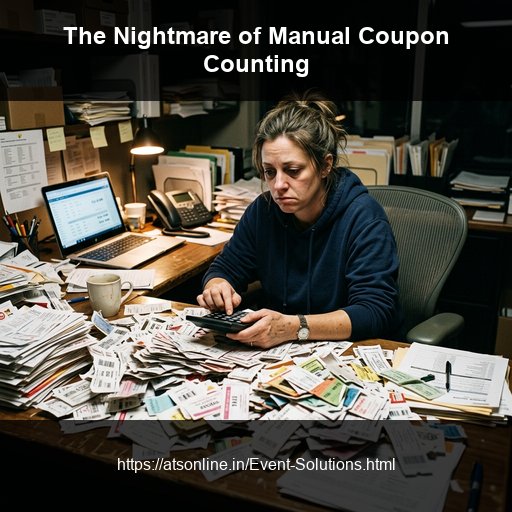
Anyone who has organized a multi-vendor cash-based event knows what happens after the gates close. While attendees are filing out, a different and far less pleasant process begins inside the event office: settlement.
At a typical 40-stall food festival, settlement looks like this. Each vendor brings their cash collection — sometimes in a sealed bag, sometimes in a cash box, sometimes in their pockets — to a designated counting area. A staff member counts the cash, bundle by bundle. The vendor watches and counts along, often disagreeing with the count on the first pass. The cash is recounted. The vendor declares what they believe they sold, based on their own internal tracking (often nothing more than a tally on a notepad or their memory of the day). The organizer's count and the vendor's declaration are compared. If they match, settlement proceeds. If they do not match — which happens more often than organizers like to admit — a negotiation begins.
This negotiation has no neutral arbiter. There is no independent record of what the stall actually sold throughout the day. The organizer has only the cash that was physically handed over; the vendor has only their own recollection or informal tracking. Both parties have an incentive to believe their own number is correct, and there is no way to settle the disagreement definitively.
For a 40-stall, 3-day food festival, this process — repeated across every vendor — typically takes 5 to 8 hours after the final day's gates close. Staff who have already worked a full event day stay late into the night counting and negotiating. Vendors, who also want to go home, become frustrated. Relationships between organizers and vendors — relationships the organizer needs for the next edition of the event — are strained by disputes that neither side can fully resolve.
This is not a minor operational inconvenience. It is one of the most consistently cited pain points among Indian event organizers who run multi-vendor formats — and it is entirely eliminated by a properly implemented automated settlement system.
What Automated Vendor Settlement Actually Means
Automated vendor settlement is the process by which a cashless payment system generates accurate, dispute-free financial reports for every vendor directly from the transaction data recorded during the event — without any manual counting, declaration, or reconciliation step.
The key word is "automated." There is no human in the loop counting cash, comparing declarations, or making a judgment call about whose number is correct. The settlement figure exists the moment the last transaction of the event is processed, because every transaction throughout the event was already recorded in real time.
This works because, in a system like WalletQrPay, there is no cash changing hands at any vendor stall. Every payment — from the first transaction at gate-opening to the last transaction before close — is a QR scan that creates an immutable, timestamped record in the cloud. The settlement report is not a summary calculated after the fact; it is a direct readout of data that has existed since the moment each transaction occurred.
How WalletQrPay Generates Per-Vendor Reports in Real Time
WalletQrPay's settlement architecture works on a continuous, real-time basis throughout the event — not as a batch process triggered only at the end.
During the event: Every transaction at every vendor stall is written to the cloud audit log the instant it is confirmed. This includes the vendor ID, the device ID that processed it, the transaction amount, and the exact timestamp. The organizer's dashboard reflects these figures live, meaning a settlement report could technically be generated at any point during the event — not just at close.
At any checkpoint during the event: Organizers running multi-day events can generate interim settlement reports at the end of each day, allowing vendors to be paid out daily rather than waiting for the full event to close. This is particularly useful for vendors managing daily cash flow needs across a multi-day exhibition or food festival.
At close of event: When the organizer closes the event session from the dashboard, a final settlement report is generated for every vendor simultaneously. There is no processing delay, no batch job that needs to run overnight, and no waiting period. The reports are ready the moment the session closes.
This real-time architecture is what allows WalletQrPay to compress a process that takes 5 to 8 hours in a cash environment into something that takes minutes.
What's Inside the Settlement Report
A WalletQrPay vendor settlement report contains the following data points, structured for both the organizer's financial reconciliation and the vendor's own record-keeping:
Total transaction count — the exact number of payments processed at that vendor's stall during the reporting period (full event, single day, or any custom date range).
Total sales value (gross) — the sum of all transaction amounts for that vendor.
Time-wise breakdown — sales broken down by hour, showing the vendor's peak periods and slow periods throughout the event. This is useful not just for settlement but for the vendor's own operational planning at future events.
Average transaction value — the mean amount per transaction, useful for identifying pricing patterns or potential data entry errors (an unusually low or high average can flag a vendor who is manually entering amounts incorrectly).
Void and reversal log — any transactions that were voided or reversed during the event, with the reason and the staff member who authorized the reversal. This ensures that the final settlement figure accounts for any corrections made during the event.
Comp transaction summary — if the vendor processed any transactions against comp wallets (sponsor credits, VIP access, staff meals), these are itemized separately so the organizer can settle comp-related costs distinctly from regular paid transactions.
Session metadata — the event name, date range, and vendor stall identifier, ensuring the report is unambiguous and auditable.
For organizers, a master settlement report aggregates all vendor data into a single document showing total event revenue, total top-up volume collected, total spend across all stalls, total refunds processed at exit, and the net settlement position across the entire event.
Paying Out Vendors: Instant Transfer vs Cash Disbursement
Once the settlement report is generated, the organizer has two standard methods for paying out vendors, and WalletQrPay's reporting supports both equally well.
Instant transfer (UPI or bank transfer) — the organizer initiates a UPI payment or bank transfer to each vendor based on the exact figure in their settlement report. This is the fastest method and creates a digital payment record that complements the WalletQrPay transaction log — giving both parties two independent confirmations of the same figure.
Cash disbursement — for organizers who prefer to pay vendors in cash (common in markets where vendors prefer same-day cash payout), the settlement report still serves as the basis for the disbursement amount. The difference from a traditional cash event is that the disbursement amount is not derived from a manual count or a vendor declaration — it is derived from the system-recorded settlement figure, which both parties have already seen and agreed matches the event's transaction history.
Many organizers use a hybrid approach: an immediate partial UPI transfer at settlement, with the balance settled the following business day after final financial reconciliation across the full event.
How Settlement Resolves Disputes Between Organizer and Vendor
The most significant operational benefit of automated settlement is not the time saved — though 5 to 8 hours per event is substantial — but the elimination of the dispute itself.
In a cash-based settlement, a disagreement between the organizer's count and the vendor's declaration has no neutral resolution mechanism. Both parties are arguing from incomplete information. The organizer only knows what cash was handed over; the vendor only knows what they believe they sold. Neither number is independently verifiable.
In a WalletQrPay settlement, there is no equivalent disagreement possible, because both the organizer and the vendor are looking at the same data — the cloud-recorded transaction log. If a vendor believes they sold more than the report shows, the organizer can show them the time-wise transaction breakdown, which accounts for every single recorded sale. If the vendor genuinely had additional sales that are not reflected — for example, if they accepted cash from a customer outside the WalletQrPay system, against the event's rules — that is now a policy violation issue, not a measurement dispute, and is handled accordingly.
This shift — from "whose number is correct" to "here is the recorded number" — fundamentally changes the tone of post-event vendor relationships. Vendors who have experienced both cash-based and WalletQrPay-based settlement consistently report a preference for the latter, specifically because it removes the adversarial negotiation that cash settlement requires.
Post-Event Analytics: Using Settlement Data to Optimize Future Events
Beyond the immediate function of paying vendors accurately, settlement data is a valuable strategic asset for planning future editions of an event.
Vendor performance ranking — organizers can identify which vendors generated the highest sales, the highest average transaction value, or the most consistent performance across multiple days. This informs decisions about which vendors to prioritize for return invitations, premium stall placement, or partnership terms at future events.
Peak hour and peak day analysis — the time-wise breakdown across all vendors, aggregated, reveals the event's actual demand pattern. This can inform staffing decisions, top-up station counts, and even programming decisions (e.g., scheduling a headline performance to coincide with peak commerce hours rather than competing with them) for future editions.
Category performance — for exhibitions or food festivals with multiple vendor categories, settlement data aggregated by category (food vs merchandise, or cuisine type) reveals which categories are driving the most revenue, informing future vendor mix decisions.
Pricing pattern analysis — average transaction values across vendors can reveal pricing trends, helping organizers advise vendors on pricing strategy for future events or identify vendors whose pricing may be miscalibrated relative to demand.
This data simply does not exist in a cash-based event. The settlement process generates it as a byproduct of the payment system itself, at no additional cost or effort beyond the cashless deployment already in place.
Frequently Asked Questions
What format are settlement reports in?
WalletQrPay settlement reports are generated in standard spreadsheet format, downloadable directly from the organizer dashboard. This allows easy import into accounting software, GST filing systems, or internal financial reconciliation tools. Reports can be filtered by date range, vendor, or transaction type.
Can each vendor see only their own settlement data?
Yes. Each vendor's access through the WalletQrPay vendor app is restricted to their own stall's data. They cannot view other vendors' sales figures, transaction counts, or settlement reports. Only the event organizer has visibility across all vendors simultaneously through the master dashboard.
How quickly after the event can I generate the settlement report?
Immediately. There is no processing delay. The moment the event session is closed from the organizer dashboard, settlement reports for every vendor are available for download. For multi-day events, interim daily reports can be generated at any point during the event without closing the full session.
Can settlement reports be used for GST filing?
Settlement reports provide the underlying transaction data — total sales value, transaction count, and date — that vendors and organizers need for GST computation. WalletQrPay does not generate GST invoices automatically, but the report data can be imported directly into standard accounting or billing software for GST filing purposes.
What happens if a transaction needs to be reversed after settlement has already been generated?
Any reversal initiated after a settlement report has been generated is logged separately and reflected in an updated or supplementary settlement report. The original report remains as a historical record; the corrected figure is clearly distinguished in the updated version, maintaining a full audit trail of any post-settlement adjustments.
Is the settlement data secure and tamper-proof?
Yes. Transaction records in WalletQrPay are written to an immutable cloud audit log at the moment each transaction is confirmed. Neither the vendor nor the organizer can edit or delete a recorded transaction directly. Any correction must go through the formal reversal process, which itself creates a new logged entry — meaning the full history of any change is always preserved and visible.
Can I pay vendors at the end of each day instead of waiting until the event closes?
Yes. For multi-day events, interim settlement reports can be generated at the end of each day, allowing daily payouts if that is the organizer's preferred arrangement with vendors. This is configured with the ATS Online team during event setup.
End the Settlement Headache at Your Next Event
WalletQrPay's automated settlement engine is built into every deployment by ATS Online — no separate configuration or add-on required.
Or call us directly at: +91-9810078010
Conclusion
By moving to a secure, software-defined QR cashless wallet setup, organizers and businesses protect their event margins, eliminate manual reconciliation delays, and deliver a frictionless transaction experience aligned with India's UPI-first payment behaviors.
Switch to UPI-native QR payments and protect your margins. Visit www.atsonline.in, call us at +91-9810078010, or email ats.fnb@gmail.com to explore WalletQrPay.