Cashless Deployments: 4 Time Windows of Planning, Onboarding, and Reconciliation
June 29, 2026 in Cashless Event Payments
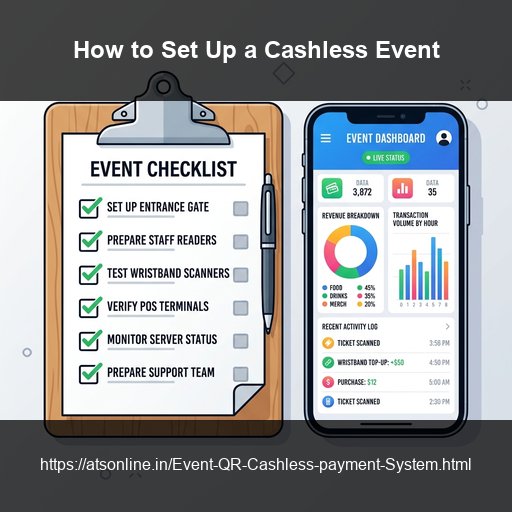
Setting up a cashless payment system for an event in India takes as little as 30 minutes on the day — but the preparation that happens 2 weeks before is what determines whether the rollout is seamless or stressful. With WalletQrPay by ATS Online, the technical deployment is handled in the cloud, so there is no hardware to procure, no infrastructure to install, and no specialist team to schedule. What you do need is a clear sequence of decisions and actions across four time windows: two weeks out, the day before, event day, and post-event. This checklist gives you that sequence in full — every decision, every task, and every person who needs to be briefed — so your first cashless event runs without surprises.
Before You Start: Choose Your Cashless Format
The choice between QR-based wallets, RFID cards, or paper coupons determines your entire infrastructure budget and setup timelines. For most Indian events, WalletQrPay is the optimal starting point: zero hardware rentals, sub-30-minute cloud activation, UPI-native top-ups, and automated closing logs.
Time Window 1: Two Weeks Before the Event (Planning & Configuration)
- ☐ Define event profile with ATS Online: Share event dates, venue location, stall count, expected footfall, and duration.
- ☐ Choose wallet structure: Pick open-value wallets for food fests/exhibitions, or denomination-based credits for corporate days.
- ☐ Pick QR delivery format: Print receipt slips at entry gates, dispatch QRs via WhatsApp, or run a hybrid mix.
- ☐ Set refund policy: Confirm that unspent balances are fully refundable at exit gates.
- ☐ Prepare vendor app credentials: Send vendor names and phone numbers to ATS Online to generate vendor logins.
- ☐ Scale top-up stations: Set up 1 top-up terminal per 1,500 expected visitors. Sourced tablets need active internet.
- ☐ Assign team roles: Appoint entry gate issuers, top-up cashiers, exit refund staff, and a dedicated Payment Ops Lead.
Time Window 2: The Day Before the Event (Testing & Calibration)
- ☐ Test vendor devices: Log into each stall phone, process a test transaction, and verify it on the organizer dashboard.
- ☐ Configure preset menus: Enter vendor pricing menus into the app to speed up transaction times during peak rushes.
- ☐ Verify top-up terminals: Test UPI, cash, and card preloads, confirming balances update instantly.
- ☐ Validate entry gate workflows: Test print runs on thermal receipt printers and mobile WhatsApp delivery.
- ☐ Check internet connectivity: Walk the venue to test cell signal speeds at the gate and peripheral stall areas.
- ☐ Prepare cash floats: Allocate floats to top-up terminals and exit refund stations.
Time Window 3: Event Day (Execution & Dashboard Monitoring)
- ☐ Activate the session: Confirm the WalletQrPay session is online.
- ☐ Open top-up counters early: Have preloads ready 30 minutes before gates open.
- ☐ Monitor real-time logs: Have the Payment Ops Lead track sales charts. Check in on any stall showing zero transactions for 30 minutes.
- ☐ Handle exceptions centrally: Process voids and QR reissuances only from the organizer dashboard.
- ☐ Announce top-up closure: Close preloads 1 hour before gates shut to encourage attendees to spend down remaining balances.
- ☐ Open exit refund lanes: Start processing remaining balances 45 minutes before close.
Time Window 4: Post-Event (Settlement & Analytics)
- ☐ Generate settlement reports: Close the session to instantly output counter reports and master revenue logs.
- ☐ Process vendor payouts: Disburse payouts based on the cloud audit logs, which eliminates disputes.
- ☐ Refund unclaimed balances: Resolve leftover balances via mobile lookup within 7 days.
- ☐ Download transaction archives: Keep the full transaction audit log for accounting and GST calculations.
Frequently Asked Questions
How long before my event should I set up WalletQrPay?
Contact ATS Online at least 2 weeks before your event to allow time for account configuration, vendor credential generation, and vendor orientation scheduling. The technical deployment itself takes under 30 minutes on event day, but the preparation window is what makes that possible. For very small events (under 10 stalls, under 500 attendees), one week may be sufficient.
Can one person manage the entire WalletQrPay system during an event?
For small events (under 500 attendees, under 15 stalls), one person can cover the payment ops lead and top-up counter roles simultaneously if the event layout keeps them within reach of both. For medium and large events, a dedicated payment ops lead who is not tied to a counter is strongly recommended — their job is dashboard monitoring and exception handling, not transaction processing.
What if a vendor refuses to use the app on the day?
This is rare but occasionally happens. The most common resolution is assigning a trained event staff member to co-manage that stall's scanning for the first hour until the vendor is comfortable. If a vendor is categorically unable or unwilling to use the app, a shared scanning counter can be designated for their stall's transactions — attendees from that stall visit the counter to pay centrally. Contact ATS Online in advance if you anticipate vendor resistance, and they can advise on the best configuration.
Is there a test mode so I can practice before the live event?
Yes. WalletQrPay provides a test mode that allows you to process sample transactions, test top-up flows, and verify dashboard reporting without affecting real wallet balances. Use this during the day-before device testing session.
What happens if the internet goes down during the event?
WalletQrPay requires active internet connectivity to process transactions. If connectivity drops at a vendor device, the app alerts the vendor that transactions cannot be processed until reconnection. The payment ops lead is alerted via the dashboard. Reconnection is automatic when connectivity is restored. For venues with known connectivity risk, ATS Online recommends a portable 4G hotspot as a backup.
Can I run WalletQrPay at multiple simultaneous events?
Yes. Multiple event accounts can be managed under a single organizer profile. Each event is a separate session with its own vendor stalls, wallet pool, and settlement reports. Useful for event companies running multiple simultaneous activations.
Conclusion
A successful cashless deployment depends on pre-event checks. Follow this step-by-step checklist to deploy secure QR event wallets with zero hardware friction.
Prepare your event payment gates with our expert checklist. Visit www.atsonline.in, call us at +91-9810078010, or email ats.fnb@gmail.com to explore WalletQrPay.