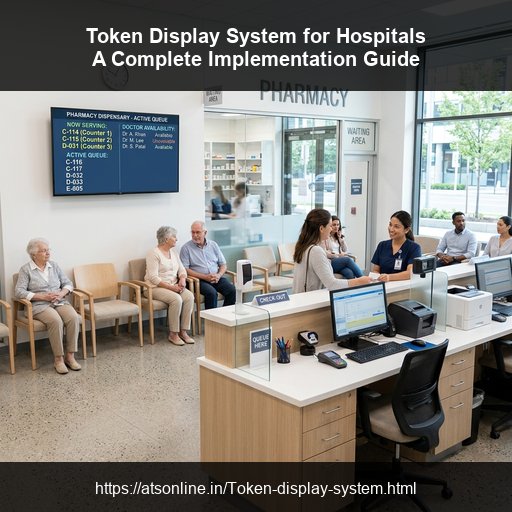
Managing patient flow is one of the most complex tasks in healthcare administration. Outpatient departments (OPD), pathology labs, billing counters, and pharmacies experience heavy crowding, leading to long wait times and visual chaos. Implementing a wireless Token Display System in a Hospital addresses these issues, ensuring a structured patient journey from entry to discharge.
Step-by-Step Hospital Implementation Roadmap
Successful hospital implementation requires organizing patient flow across different zones:
Step 1: Patient Check-In & Ticketing Kiosks
At the main entrance or reception desk, set up self-service touchscreen kiosks or reception terminals. Patients select their service category (e.g., General OPD, Pediatrics, Lab Test, Billing) and receive a printed token ticket. This segments patient streams immediately at the door.
Step 2: Waiting Lounge Smart TVs
Mount flat-screen Smart TVs in waiting lounges. Using standard web browsers on these TVs, load your unique, secure queue display URL. These screens will display the active token numbers for different doctor consulting chambers or test labs, keeping patients informed.
Step 3: Consultation Room Doctor Calling Panels
Inside each doctor's consulting room, set up a simple calling panel on the doctor's desktop or tablet. When ready for the next patient, the doctor clicks "Next." The Smart TV outside the chamber instantly updates with the token number, accompanied by a voice announcement (e.g., "Token 104, please enter Room 3").
Step 4: Pharmacy & Lab Integration
Integrate the queue system with billing counters, lab collection points, and pharmacy pickup desks. For example, once the pharmacy prepares a prescription, the pharmacist calls the patient's token number. This clears counter congestion and keeps pharmacy queues flowing.
Best Practices for a Smooth Rollout
Keep these guidelines in mind during setup:
- Provide Multi-Lingual Voice Alerts: Hospital visitors include elderly or distracted patients. The system should announce called tokens out loud in multiple regional languages so patients don't miss their turns.
- Ensure Offline Capabilities: Broadband outages are common. Choose a wireless token display system (such as ATSonline's software) that runs over a local Wi-Fi network, ensuring the queue system remains operational during internet drops.
- Use Digital Signage to Educate: Use the same Smart TV screens to display health tips, doctor schedules, or safety protocols alongside queue numbers, making waiting time educational.
Why Choose ATSonline for Healthcare Queueing?
ATSonline's MyTokenDisplay software provides a flexible, hospital-ready queue management solution. It integrates easily with hospital billing desks and offers remote analytics reporting, helping healthcare administrators monitor patient flow, reduce bottleneck wait times, and improve overall hospital ROI.
Frequently Asked Questions (FAQs)
Q1: Where should displays be placed in a hospital queue system?
Displays should be placed in major waiting areas: the main reception lobby, outpatient department (OPD) waiting lounges, billing desks, and pharmacy collection counters.
Q2: How do doctors call patients in a hospital token system?
Doctors use a simple web panel or software keypad on their consulting room computer or tablet. Clicking 'Call Next' updates the OPD TV screen outside and plays a voice alert.
Q3: Can hospital queue systems handle multiple departments?
Yes, advanced queue systems allow a single display screen to segment and show tokens for different chambers (e.g., Pediatrics, Cardiology, Pharmacy) simultaneously.