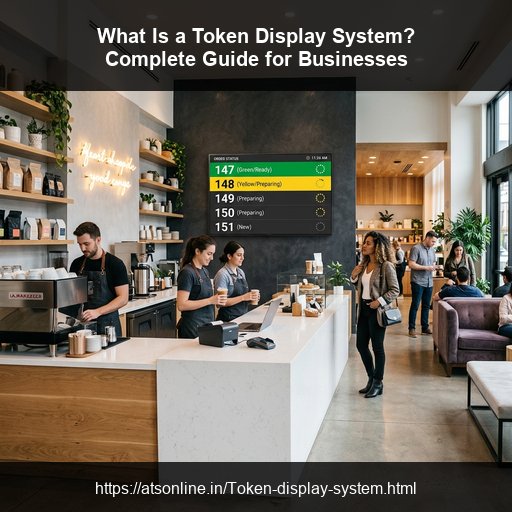
Waiting in unstructured lines is one of the primary sources of customer frustration. Whether at a busy quick-service restaurant (QSR), a hospital clinic, a bank, or a government office, long queues can create visual chaos, lead to staff stress, and result in lost sales. A Token Display System addresses this challenge directly by replacing physical lines with organized numbers, bringing structure and efficiency to your service counter.
Understanding the Basics of a Token Queue System
At its core, a token display system is a digital queue manager. Instead of standing in a physical line to wait for service, a customer receives a numbered ticket (known as a token) upon placing an order or registering at reception.
As counter staff process the orders or service requests, they use a keypad, mobile application, or web dashboard to call the next number. The central display screen instantly updates with the ready token number, notifying the customer with a visual change and an auditory chime or voice alert. This enables customers to sit comfortably in a waiting area instead of crowding around the counter.
Key Components of a Token Queue System
A standard token display system consists of three main elements:
- Token Dispenser: The entry point where customers receive their numbers. This can range from a touchscreen self-service kiosk to a manual roll dispenser or a standard cashier billing terminal.
- Display Screen: The screen that shows the active queue status. Historically, businesses used red 7-segment LED boards. Today, businesses utilize modern flat-screen Smart TVs connected over Wi-Fi.
- Staff Controller: The interface used by counter staff to call the next number. Modern solutions offer software-based keypads on tablets, phones, or POS screens rather than physical, single-purpose hardware keypads.
Legacy LED Boards vs. Modern Smart TV Token Displays
Traditional token systems rely on wired LED segment boards. However, legacy systems have severe limitations. They require extensive physical wiring, are prone to hardware bulb failures, are limited to showing only numbers, and cannot be customized without replacement.
In contrast, a modern wireless Token Display System runs completely on cloud technology. By using a standard web browser on a Smart TV, businesses can display active token numbers without any specialized wiring. These systems support multi-counter layouts, display promotional advertisements or videos alongside the numbers, and announce tokens using multi-lingual voice alerts (such as "Token Number 105, please collect from Counter 2").
Why Modern Businesses Need a Token Display System
Implementing a modern wireless token display system offers multiple strategic advantages:
1. Reduces Perceived Wait Time
Uncertainty makes waiting feel longer. By clearly displaying active numbers and showing which counter is serving which token, customers stay informed. Furthermore, showing promotional videos or entertainment feeds on the same Smart TV screen keeps customers engaged, reducing perceived wait times significantly.
2. Eliminates Counter Crowding
Crowded counters block traffic and create an uncomfortable atmosphere. A token display system allows customers to wait at a safe distance in a lobby or dining area. This is highly beneficial for food courts and canteens (see our guide on canteen management software) where pickup lines can block main corridors.
3. Enhances Staff Productivity
Staff members no longer need to call out names or shout order numbers over noisy rooms. By clicking a button on their POS billing system (like a restaurant POS) or a tablet, the system automatically handles visual updates and audio announcements, keeping staff focused on service speed.
4. Scalable Across Multiple Departments
A wireless token system can handle multiple departments or service desks. For example, in a medical facility, the screen can display numbers for the pharmacy, registration counter, and consultation rooms simultaneously, keeping the entire facility synchronized.
Step-by-Step: How a Cloud-Based Token System Works
A modern cloud-based system like ATSonline's MyTokenDisplay operates through a seamless workflow:
- Order Placement: The customer places an order or checks in. The staff issues a receipt with a token number (e.g., Token #202).
- Visual Waiting: The customer sits down. The Smart TV displays Token #202 in the "Preparing" or "Pending" list.
- Staff Call: When the service is ready, the staff member clicks "Call" on their dashboard.
- Automatic Announcement: The TV plays a chime and announces the number. The number flashes on the screen in the "Ready" section.
- Collection: The customer walks to the designated counter, presents their ticket, and receives service.
Frequently Asked Questions (FAQs)
Q1: What is a token display system?
A token display system is a queue management tool that displays order or queue numbers (tokens) on a screen to notify customers when it is their turn. It replaces unstructured waiting lines with organized numbers.
Q2: What is the difference between an LED token display and a Smart TV token display?
Traditional LED token displays are physical, hardwired boards showing only numbers. Smart TV token displays are software-based systems that run in a TV's browser, supporting sound alerts, voice calling, multiple counter updates, and digital signage/promotional media.
Q3: Can a wireless token display system be customized for different departments?
Yes, advanced cloud-based wireless token systems can be divided by departments, counters, or categories. The screen will dynamically show which counter (e.g., Counter 1, Counter 2) is calling which token number.