Operations Playbook: Managing High-Capacity Gate Entrances
June 28, 2026 in Event Ticketing Solutions
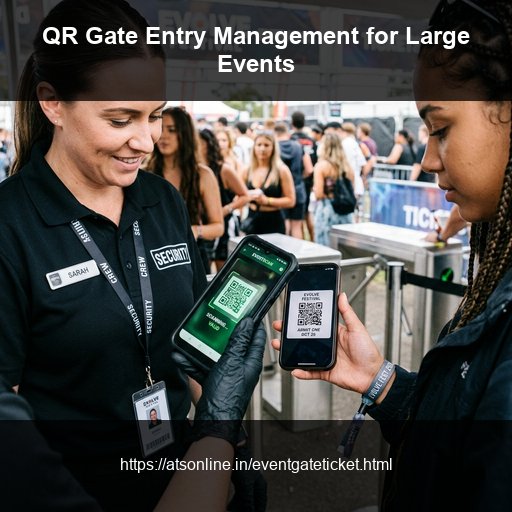
Gate entry is the first physical experience your attendees have of your event. A smooth, fast, organized entry sets the tone for everything that follows. A chaotic gate — long queues, confused staff, counterfeit disputes, manual lists — creates a negative first impression that no amount of great programming inside can fully recover. For events with 500 or more attendees, managing gate entry manually is not just inefficient — it's a genuine operational and safety risk. QR code scanning solves the core problems: speed, accuracy, fraud prevention, and real-time headcount. This guide is a practical operations manual for setting up and running QR code-based gate entry at events of all sizes.
Why QR Code Gate Entry Outperforms Every Other Method
Manual paper checks take 15–25 seconds per attendee and allow high rates of fraud. Standard 1D barcodes require dedicated scanning guns. RFID taps are the fastest (under 1 second) but add wristband hardware costs. Smartphone browser-based QR scanning provides the optimal sweet spot: 1-2 second scan verification speed, instant database synchronization, and zero hardware overhead (any mobile camera works).
Pre-Event: Setting Up QR Code Gate Entry
Step 1: Choose the Right Ticketing Platform
You need a platform that generates unique QR codes, checks against a live central database, and does not require app downloads for gate staff. EventGateTicket by ATS Online supports all of these, offering browser scanning and custom offline backup nodes.
Step 2: Plan Your Gate Layout
Allocate scanning stations based on expected crowd flows. Setup separate entry lines for General Admission, VIP fast lanes, and Crew/Artist check-ins. If you expect high volume arrivals, structure your queue paths with barricades to keep attendees in single-file lines.
| Expected Arrivals (1st Hour) | Minimum Scanning Stations Needed |
|---|---|
| Under 300 | 1–2 stations |
| 300–600 | 2–3 stations |
| 600–1,000 | 3–4 stations |
| 1,000–2,000 | 5–7 stations |
| 2,000–4,000 | 8–12 stations |
Briefing Gate Staff
Provide a 5-minute training session for all gate volunteers. Confirm they know how to open the scanner URL, recognize green ticks (valid entries) vs. red blocks (already scanned/invalid), and escalate issues (e.g., ticket lookup by email) to a supervisor station.
Running Gate Operations on Event Day
- Perform opening checks: Test-scan one ticket at every station 45 minutes before opening.
- Instruct the queue: Place signs and volunteers along the line reminding attendees to open tickets and maximize screen brightness.
- Resolve issues: Direct tickets that won't load or scan-error messages to a separate supervisor desk to keep the main lines moving.
- Monitor dashboard: Track entry metrics in real time to re-deploy scanners as needed.
Post-Event: Gate Data and Reporting
Export check-in data to verify actual attendance, calculate no-show ratios, and evaluate peak arrival periods. This data helps you optimize staffing plans for future events.
Frequently Asked Questions
Do gate staff need training on the scanning system?
Minimal training is needed. The scanner URL opens a camera view, attendees present their QR code, and a clear visual confirmation appears. A 5-minute briefing plus a live test scan is sufficient for most volunteers.
Can one phone handle multiple ticket tiers at the same gate?
Yes. The single scanner URL validates all ticket tiers created under that event. The scan confirmation displays the tier name so staff can see whether the attendee has GA, VIP, Day 1, Day 2, etc.
What's the maximum speed of QR scanning per hour?
A single scanning station can process 250–300 attendees per hour at comfortable speed (one scan every 12–15 seconds including attendee movement). Plan your stations accordingly.
Can we use EventGateTicket for a ticketed event within a larger free event?
Yes. Create a separate event in your dashboard for the ticketed session. Gate staff at the ticketed zone use the scanner URL for that specific event only, separate from any broader free-entry access.
Is the scanner affected by screen brightness or ticket orientation?
The scanner reads QR codes in most lighting conditions. For nighttime outdoor events, ask attendees to increase screen brightness before reaching the scanner. Orientation (portrait vs. landscape) doesn't matter.
Conclusion
QR code gate entry management takes a stressful, error-prone part of event logistics and makes it fast, secure, and data-driven. With browser-based scanning, you need no special hardware—only a modern smartphone camera and EventGateTicket.
Simplify gate operations and track your live attendee count. Visit www.atsonline.in, call us at +91-9810078010, or email ats.fnb@gmail.com to explore EventGateTicket.