Gate Contingency: Managing Signal congestion, physical obstructions, and single failure points
June 28, 2026 in Event Ticketing Solutions
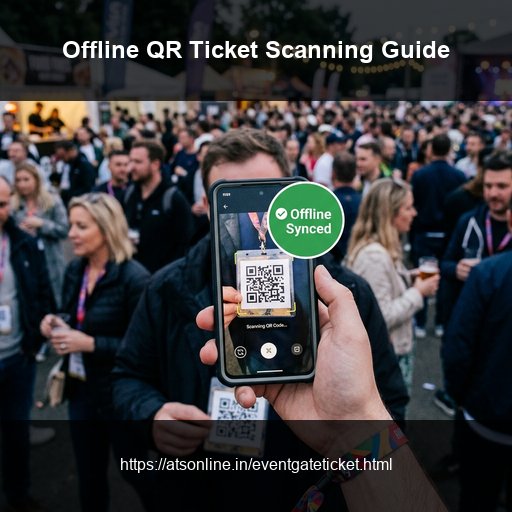
Every event organizer who has run a medium or large event has either experienced it or feared it: the moment on event day when the gate scanner stops working because the mobile data connection dropped. The queue is building. Attendees are impatient. Your gate staff are staring at a loading screen. And you have no backup. Connectivity failure at the gate is one of the most common and most preventable event-day crises. It is common because a significant proportion of event venues — outdoor grounds, beach locations, basements, warehouse spaces, remote farmhouses — have genuinely unreliable mobile data at the specific point where gate entry happens. It is preventable because offline scanning technology exists and is deployable at any event with advance planning. This guide explains exactly why connectivity fails at event gates, how offline QR ticket scanning works, how to set it up, and what your contingency plan should be even if you've done everything right.
Why Internet Fails at Event Gates
- Network Congestion: Thousands of attendees arriving simultaneously overload local cell towers, dropping carrier signal speeds for gate devices.
- Physical Obstruction: Basement structures (clubs, sub-ground halls) and metal frameworks act as Faradays cages, blocking data signals.
- Shadow Areas: Remote farmhouses, forest grounds, and coastal venues are naturally prone to cellular coverage gaps.
- Single Point of Failure: Relying on standard 4G connections without an offline or local Wi-Fi fallback exposes operations to outages.
How Offline QR Ticket Scanning Works
Offline scanning allows gates to validate tickets without an active network connection. Before the event, the scanner downloads a local snapshot of the valid ticket database. The scanner checks ticket QR codes against the local cache, marks them as scanned, and synchronizes the logs back to the cloud when internet returns.
EventGateTicket's Offline Scanning Nodes
For locations with weak networks, request an offline node configuration from ATS Online (+91 9810078010 or akash@atsonline.in) at least one week before your event. This provides local sync operations without requiring active cell signals.
Managing Multi-Gate Sync Risk
When multiple gates operate offline simultaneously, they cannot see each other's scan logs in real time. Mitigate duplicate entry risks by:
- Strict day/gate rules: Route ticket tiers through dedicated gates.
- Wristbands: Issue physical wristbands upon the first scan to confirm entry.
- Quick syncs: Restore connection periodically to synchronize caches.
Pre-Event Connectivity Assessment Checklist
- Test Gate Spots: Walk to the exact gate location and test checkout/scan loads 24 hours prior to door-open.
- Carrier Checks: Validate signals across different carriers (Airtel, Jio, Vi).
- Decision Rules: Establish a clear threshold (e.g. if scans take over 4 seconds, switch to offline mode).
- Sync Late: Perform the final database sync on offline nodes as late as possible.
Frequently Asked Questions
How far in advance do I need to request offline scanning from ATS Online?
At least one week before your event. For large events (1,000+ attendees) or complex multi-gate deployments, contact ATS Online 2–3 weeks in advance.
Does offline scanning cost extra?
Contact ATS Online directly for offline node deployment pricing for your event: akash@atsonline.in or +91 9810078010. For events already using EventGateTicket, offline configuration is discussed as part of the event support arrangement.
What if a ticket is generated after the offline node has synced?
Tickets generated after the offline sync (e.g., last-minute walk-in registrations or late online purchases) will not appear in the offline node's local database until the next sync. For this reason, always sync the offline node as late as possible before doors open, and process any walk-ins through the online system if connectivity is available — switching to offline only when the online mode becomes too slow.
Can I use a local Wi-Fi network (venue Wi-Fi or a portable router) instead of mobile data?
Yes, if a reliable local Wi-Fi network is available, your browser-based scanner can run on it in online mode without requiring mobile data. A portable 4G router with a strong signal can also provide a dedicated, less congested connection for gate devices while separating gate scanning from the venue-wide congestion. This is a viable alternative to offline nodes for venues where mobile congestion (rather than genuine coverage gaps) is the primary issue.
How long does the offline sync take?
For events with up to 5,000 tickets, the initial offline sync typically takes under 60 seconds on a normal 4G connection. Larger events may take 2–3 minutes. Always allow adequate time before doors open.
Conclusion
Do not let network drops ruin your event gate experience. Pre-syncing offline ticket caches and carrying printed fallback attendee lists keeps queues moving under any network condition.
Maintain continuous gate scan operations under poor network conditions. Visit www.atsonline.in, call us at +91-9810078010, or email ats.fnb@gmail.com to explore EventGateTicket.