Closed-Loop Mechanics: Gate setups, Top-Up Terminals, and Smartphone Scans
June 29, 2026 in Cashless Event Payments
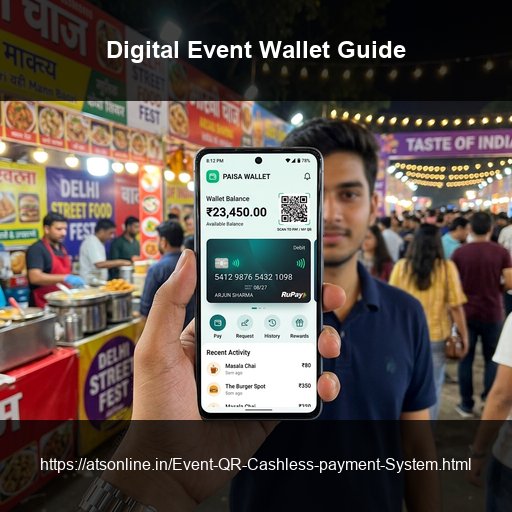
A QR cashless payment system at an event works by issuing each attendee a unique QR code linked to a digital wallet. The attendee loads money into that wallet using UPI, card, or cash at a top-up counter, then pays at any vendor stall by showing the QR for a quick scan — with payment confirmed in under one second. All transactions are recorded in real time on a cloud dashboard visible to the event organizer, and any unspent balance is refunded at the exit. That is the short version. Below is everything an event organizer needs to understand the complete flow — from the moment the first attendee walks in to the moment the last vendor is settled.
Why Are Event Organizers Switching to QR Payments?
For decades, Indian events managed transactions through one of two methods: physical cash at stalls, or printed paper coupon booklets purchased at a central counter. Both methods share the same fundamental problems — cash can be pilfered, paper coupons can be duplicated, and neither gives the event organizer any real-time visibility into what is actually happening at their stalls.
A QR cashless system solves all of this without adding hardware, without requiring attendees to download anything new, and without asking vendors to learn complex software. In India's UPI-native market, the attendee-side experience is nearly identical to what they already do every day at restaurants and shops. The result is faster transactions, eliminated leakage, real-time sales data, and automated vendor payouts — running on the smartphones and tablets that event staff already carry.
The 4-Step WalletQrPay Flow, Explained in Detail
Step 1: Wallet Issuance — The Attendee Gets Their QR Code
The process begins at the event entry gate. When an attendee arrives, the entry counter staff activates a wallet session for them in the WalletQrPay system. The system generates a unique, encrypted QR code linked to that attendee's wallet. This QR code is then delivered to the attendee in one of two ways:
- Printed slip: The QR is printed on a small receipt-size slip of paper (any standard thermal receipt printer works). The attendee keeps this slip throughout the event.
- Mobile delivery: The QR is sent directly to the attendee's mobile number as a WhatsApp message or SMS image. The attendee uses the image on their screen at vendor stalls.
Each QR code is cryptographically unique. There are no two identical codes in any event session. The security engine rejects any scan that attempts to reuse a code already presented to a different device.
Step 2: Top-Up — The Attendee Loads Money Into the Wallet
Once the attendee has their QR code, they visit a top-up station to load money into their wallet. Top-up stations are typically placed near the entry area — staffed by the organizer's team. The top-up process is fast:
- The attendee presents their QR (printed slip or phone screen).
- The counter staff scans the QR on the WalletQrPay top-up interface.
- The attendee decides how much to load.
- They pay using any of the accepted methods: UPI (PhonePe, Google Pay, Paytm, BHIM, or any other), credit/debit card, or physical cash.
- The balance appears in their wallet immediately.
Attendees can top up their wallet multiple times during the event. Top-up can also be triggered from any vendor device, which is useful during peak hours.
Step 3: Vendor Scan-and-Pay — Payment in Under 1 Second
At each vendor stall, payment works like this:
- The attendee selects what they want and tells the vendor.
- The vendor opens the WalletQrPay vendor app on their phone or tablet.
- They either tap a preset item from their menu or manually enter the transaction amount.
- They point the phone camera at the attendee's QR code.
- The QR is read, the transaction is confirmed in the cloud, and the amount is deducted from the attendee's wallet — in under one second.
There is no physical card to tap, no PIN to enter, and no receipt to sign. The process is faster than any cash transaction.
Step 4: Refund at Exit — Unspent Balance Returned
As the event winds down, any unspent wallet balance is refunded at the exit counter. The refund flow is simple:
- The attendee presents their QR at the exit counter.
- Staff pull up the wallet balance.
- The attendee chooses their refund method: UPI transfer (instant) or cash.
- The refund is processed and the wallet is closed.
A clean, fast refund process builds trust and encourages higher wallet top-up amounts.
What Happens on the Organizer's Dashboard in Real Time?
While all of the above is happening on the event floor, the organizer has a central cloud dashboard showing:
- Live total revenue: The running sum of all transactions across all vendor stalls.
- Per-vendor sales: A breakdown of each stall's transaction count and total sales value, making it immediately visible which stalls are performing.
- Top-up volume and pace: Total wallet top-ups vs total spend, helping identify whether top-up counters need to be expanded.
- Active wallets: The number of live wallet sessions currently in the event.
How Does the System Handle Security and Fraud?
Security in WalletQrPay operates at three layers:
- Layer 1 — QR Encryption: Each QR code is generated with a unique encrypted token tied to a single wallet session.
- Layer 2 — Duplicate Scan Rejection: If the same QR code is scanned simultaneously or in quick succession by two different devices, the cloud security engine rejects the second scan in under one second.
- Layer 3 — Transaction Audit Log: Every transaction is written to an immutable audit log with a timestamp, device ID, vendor ID, counter ID, and session token.
Frequently Asked Questions
Does the attendee need to install any app?
No. Attendees do not install anything. Their wallet is a QR code — either a printed slip or a phone screen image. They top up using their existing UPI app, which every Indian smartphone user already has. There is zero onboarding friction for the attendee.
Does the vendor need a special device or POS terminal?
No. Any standard Android or iOS smartphone or tablet can run the WalletQrPay vendor app, which is downloaded from the app store. The phone's built-in camera handles QR scanning. No external scanner, card reader, or proprietary terminal is required.
How long does a vendor scan-and-pay actually take?
Under one second from scan to confirmation. In a direct timed comparison with cash transactions (average 25–40 seconds including change counting) and paper coupons (average 15–20 seconds including manual coupon exchange), WalletQrPay is significantly faster, which translates directly to higher stall throughput at peak hours.
Can a vendor process a refund or reversal?
Vendors cannot initiate reversals independently — this is a deliberate security design. All reversals are initiated by the event organizer through the dashboard, which creates an audit record and prevents vendors from issuing fraudulent self-reversals. For attendee refund requests at vendor stalls, the vendor directs the attendee to the organizer's information counter.
What happens if an attendee loses their printed QR slip?
The organizer's team can look up the wallet by the attendee's registered mobile number and reissue a new QR code for the same session. The original QR is simultaneously deactivated in the cloud. No funds are lost.
How many vendor stalls can WalletQrPay handle simultaneously?
There is no technical upper limit. Because the system is cloud-native, it scales horizontally with demand. Events with 200+ simultaneous vendor stations have been managed without performance degradation. Adding more vendors means installing the app on one additional phone — not adding hardware.
Can WalletQrPay handle multi-day events?
Yes. The wallet session can be configured for 1-day, multi-day, or open-ended duration. For multi-day events, wallet balances carry over between days. Vendor session reports can be generated at the end of each day individually, as well as a cumulative report at close of event.
Conclusion
Closed-loop digital QR wallets streamline event payments by automating gate issuance, UPI-based top-ups, sub-second vendor scanning, and exit refunds.
Optimize transaction times and monitor sales in real-time. Visit www.atsonline.in, call us at +91-9810078010, or email ats.fnb@gmail.com to explore WalletQrPay.