Unleashing Portable Checkout Power: Offline Android POS Guide
June 19, 2026 in Event Solutions
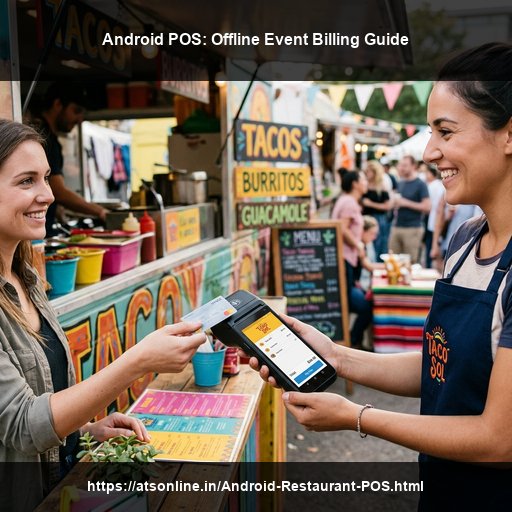
Flea markets, food festivals, underground music tours, and B2C trade exhibitions are popping up all over India. For these temporary events and pop-up stalls, setting up traditional countertop billing desks is physically and logistically impossible. Stalls are small, power outlets are scarce, and transaction speed is critical. While smartphones have made mobile payments accessible, relying on standard online UPI apps at crowded venues is risky due to cellular network failures. To address this challenge, organizers and vendors are turning to **android pos offline event billing** systems to maintain fast, reliable transactions in any environment.
The Anatomy of a Handheld Android POS Device
An Android POS terminal is an all-in-one handheld billing device. Built on the Android operating system, it combines multiple hardware features into a single, compact body:
- High-Definition Touchscreen: Displays a visual menu card for cashiers to select items with a single tap.
- Built-in Thermal Receipt Printer: Prints high-speed paper receipts on the spot, eliminating the need for external printers and cables.
- NFC/RFID Chip Reader: Reads and writes to cashless event cards or wristbands instantly.
- Rugged Design: Built to withstand kitchen spills, dust, and drops.
- High-Capacity Battery: Provides 12+ hours of active use, allowing stalls to operate all day without recharging.
The Challenge: Network Congestion at Live Venues
Indian pop-up stalls and food festivals face a unique problem. When thousands of visitors gather in a tight space (like a park, stadium, or exhibition hall), cellular towers get overwhelmed. Mobile data speeds drop to zero. Cashiers trying to process online card payments or verify UPI transfers face loading screens and transaction timeouts. This network congestion slows down checkout times, causes long lines, and frustrates customers. An offline Android POS system bypasses this issue entirely by processing payments locally on the device and physical card chip without needing an active internet connection.
Step-by-Step Guide to Setting Up Offline Billing
To successfully run offline billing on Android POS terminals, follow these key steps:
Step 1: Local Database Caching
Before the event starts, load the vendor’s complete menu, item prices, taxation splits, and cashier logins directly onto the Android POS memory. Caching this data locally ensures the terminal can load menus, calculate tax breakdowns, and process transactions without querying a cloud server.
Step 2: Closed-Loop RFID Card Billing
In an offline closed-loop system, visitor balances are stored securely on the microchip of their physical RFID card. When a customer pays, the cashier taps the card against the back of the Android POS terminal. The terminal reads the balance, deducts the order amount locally, writes the new balance back to the card, and prints a receipt. The entire transaction takes less than 0.5 seconds and requires zero internet.
Step 3: Secure Local Transaction Logging
Every transaction completed offline is saved securely in the terminal’s local encrypted database. The terminal logs transaction details, including the stall ID, timestamp, items purchased, amount spent, and unique card identifier, ensuring data security.
Step 4: Automatic Cloud Synchronization
When the event ends, or when network connectivity becomes stable (via cellular data or a local Wi-Fi network), the Android POS terminals automatically sync and upload their offline transaction logs to the cloud. This updates the central dashboard, giving organizers complete visibility into overall sales and vendor performance.
Why Choose ATS Android POS Solutions?
To ensure operational reliability at temporary venues, partner with a proven technology provider. The Advance Technology Systems (ATS) Android POS solution offers a complete event billing package tailored for Indian conditions:
- Robust Offline Performance: Run transactions smoothly even during cellular network failures.
- Integrated Hardware: Access rugged handheld Android POS terminal rentals with built-in printers.
- Seamless Event Solutions Integration: Connect Android POS terminals to our closed-loop RFID event card system. Learn more about our comprehensive Event Solutions.
- On-Site Technical Support: Benefit from dedicated on-site technical support to handle hardware swaps and configurations.
Conclusion: Keep Your Pop-Up Stalls Moving
For pop-up stalls and live events, transaction speed and operational reliability are key. Relying on slow, internet-dependent payment methods causes long lines, delays service, and leads to lost sales. By deploying handheld **android pos offline event billing** systems, you keep transaction times under a second, secure your revenue, and provide a fast, convenient experience for your guests.
Ready to deploy a world-class cashless setup at your next event? Contact Advance Technology Systems (ATS) to get started.
You can reach us by phone at +91 9810078010 or by email at ats.fnb@gmail.com. Thank you for your interest in our services.
Maximize your pop-up stall transaction efficiency today. Visit www.atsonline.in, call us at +91-9810078010, or email ats.fnb@gmail.com for Android POS solutions.