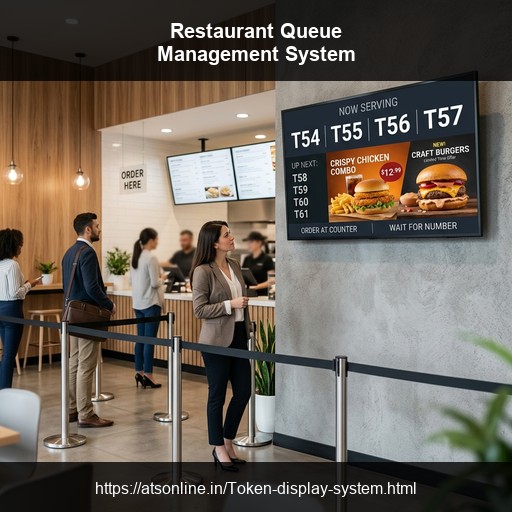
Every restaurant owner in India knows the Friday evening problem. The waiting area is packed, customers are asking every two minutes "how much longer?", the host is juggling a paper list and a ringing phone, and two customers just walked out because they could not tell whether they had been forgotten.
A queue management system for restaurants eliminates this entirely. It brings order to your waiting area, keeps customers informed and calm, speeds up table turnover, and turns your display screen into a promotional tool — all without expensive hardware or a complicated setup.
This guide covers everything restaurant owners, food court managers, and QSR operators in India need to know about choosing and setting up the right queue management system.
1. The Real Cost of Poor Queue Management in Restaurants
Before looking at solutions, it is worth understanding how much an unmanaged queue actually costs a restaurant.
- Walk-outs and lost revenue: Industry research suggests 30–40% of customers leave if the queue is disorganised.
- Negative reviews: "Long wait and no one told us how much longer" is a top complaint on Zomato and Google.
- Staff overwhelm: Hosts make errors when juggling paper lists and crowds.
- Table turnover inefficiency: Tables sit empty while hosts search for the next waiting party.
2. How a Queue Management System Works in a Restaurant
A cloud-based restaurant queue management system adapts to two main models:
Model 1 — Dine-In Waiting Queue
The host issues a token to arriving customers. Customers watch the display TV in the waiting area. When a table is ready, the host calls the token. The TV updates and a voice announces: "Token 12, your table is ready".
Model 2 — Order-Ready Notification (QSR / Counter Service)
Customers order and receive a token. Kitchen staff tap the token number when food is ready. The display updates: "Order number 47 is ready for collection".
3. Types of Restaurants That Need a Queue System
- Full-Service Restaurants: Manages waiting lists, reducing customer anxiety.
- QSRs (Fast Food/Thali): Order-ready notification clears counter congestion.
- Cloud Kitchens: Organises takeaway and delivery pickup windows.
- Dhabas: Reduces burden on servers handling 200-500 covers daily.
- Buffets & Banquets: Controls batch entry to prevent food station crowding.
4. Key Features to Look for in a Restaurant Queue System
- Voice Announcement: Essential to cut through ambient dining room noise.
- Display on Existing TV: Uses any browser-enabled Smart TV.
- Digital Signage: Show today's specials, combo deals, or happy hour offers.
- Recall Function: Easily re-announce a token if a customer missed it.
- No App Required: Customers shouldn't need to download anything.
- Thermal Token Slip: Supports standard 58mm printers for receipts.
5. 4 Display Modes and Which Works Best for Restaurants
Mode 1 — Standard Multi-Input (Recommended for QSRs)
Shows one large token number. Highly visible across a dining hall. Best for single-counter operations.
Mode 2 — Media Split (Recommended for Casual Dining)
60% shows promotional content (combos, desserts); 40% shows the token number. Great for upselling waiting customers.
Mode 3 — Location Grid (Recommended for Food Courts)
Shows all active counters in a grid. Essential for multi-cuisine food courts where customers track multiple orders.
Mode 4 — Thermal Print (Takeaway/Cloud Kitchens)
Auto-sequential numbers with printed slips for high-volume pickup.
6. How Restaurants Use Digital Signage to Increase Revenue
Waiting customers are a captive audience. Use the display to show:
- Chef recommendations and high-quality food images.
- Combo upgrades ("Add a dessert for ₹99").
- Happy hour and time-sensitive promotions.
- Loyalty program sign-ups.
- Social media prompts ("Leave us a review on Google").
7. Traditional Buzzer Systems vs Cloud-Based Token Display
| Aspect | Physical Buzzer / Pager System | ATS Cloud-Based Token Display |
|---|---|---|
| Hardware cost | ₹15,000 – ₹60,000 | ₹0 (uses your TV) |
| Maintenance | Constant daily charging, replacements | None |
| Hygiene | Shared physical device | No shared device |
| Promotional content | ❌ None | ✅ Full digital signage capability |
| Customer visibility | ❌ Customer doesn't know queue position | ✅ Customer sees exactly how many are ahead |
8. Cost of a Queue Management System for Restaurants in India
The ATS Cloud-Based System costs ₹2,950 per counter per year (GST extra).
- Small QSR / Casual dining (1 counter): ₹2,950/yr
- Takeaway + Dine-in (2 counters): ₹5,900/yr
- Food court (6 counters): ₹17,700/yr
A restaurant doing ₹40,000 daily with a 5% improvement in table turnover gains ₹60,000 per month. The ROI pays for itself in the first week.
9. Step-by-Step Setup for Restaurants
Setup takes under 10 minutes:
- Contact ATS to create your account.
- Log into the dashboard to define your counters (e.g., "Takeaway", "Dine-in").
- Choose your display mode (Standard, Media Split, etc.).
- Open the URL on your restaurant TV.
- Share the keypad URL with your host or kitchen staff on their phones.
10. Frequently Asked Questions
Does it integrate with our POS?
No, it is completely independent. Token numbers are assigned at order time but don't need to sync with the POS.
Can we run promos in a regional language?
Yes, you can upload any image or video content in any language.
What if the internet goes down?
The last displayed token remains on screen. Staff can call verbally. A backup 4G router is a cheap failsafe.
11. Conclusion
A queue management system is no longer a luxury. The ATS cloud-based token display system costs less than a single day's food wastage, eliminates walk-outs, speeds up turnover, and turns your TV into a revenue-generating channel. Setup takes under 10 minutes with no new hardware required.
Related Reading:
- Token Display System for Banks
- Token Display System for Hospitals
- Cost Comparison Guide
- TV Setup Guide
Stop Losing Customers to Long Queues
Contact ATSonline to set up your zero-hardware Token Display System in under 10 minutes.
📞 Call us at +91 9810078010
✉️ Email us at ats.fnb@gmail.com