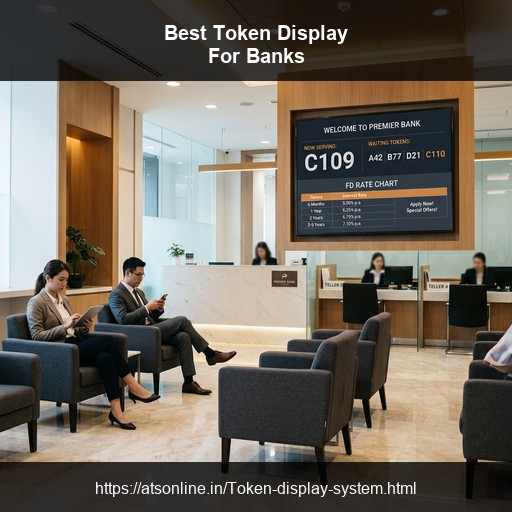
Walk into any busy bank branch in India on a Monday morning and you will see the same scene — customers crowding at counters, arguing over whose turn it is, tellers overwhelmed, and a branch manager fielding complaints. Long queues and poor queue visibility are among the top reasons customers switch banks or leave negative reviews.
A token display system for banks solves this completely. It brings order to the branch, reduces customer frustration, frees teller staff to focus on service, and even helps cross-sell financial products during waiting time — all without expensive hardware or complex installation.
This guide covers everything a bank branch manager or finance office administrator needs to know about choosing and setting up the best token display system in India.
1. Why Banks and Finance Offices Need a Token Display System
Banking is one of the most queue-intensive service environments in India. A typical urban bank branch handles 150–400 customer transactions daily across multiple service types — cash deposits and withdrawals, account opening, loan applications, fixed deposits, demand drafts, and more.
Each of these services involves different counters, different processing times, and different customer needs. Without a structured queue system, the result is predictable: chaos.
The specific problems banks face without a token system:
- Unequal wait times across counters: Customers crowd at whichever counter looks shortest, overwhelming tellers handling simple transactions.
- Customer disputes: "I was here before him" is a daily occurrence.
- No visibility: Customers standing in line cannot tell how long they will wait.
- Lost cross-selling opportunities: Waiting customers staring at walls are a missed marketing opportunity.
- Regulatory pressure: RBI guidelines and branch audits focus on customer service standards.
2. How a Token Display System Works in a Bank
A modern cloud-based token display system operates simply:
- Customer enters: Receives a token number at the reception desk.
- Customer waits: The branch TV monitor shows which token number is currently being served.
- Teller calls token: The teller taps a button on their phone or computer, updating the display and triggering a voice announcement.
- Customer proceeds: They go straight to the designated counter without confusion.
- Manager monitors: The branch manager sees all queue lengths and history in real time.
3. Key Features Banks Must Look For
Not all systems are built equally. Here is what to insist on:
- Multi-Counter Support: Handle cash, accounts, and loans simultaneously without overlap.
- Alphanumeric Prefixes: Tokens like "CASH-12" or "LOAN-03" instantly tell the customer which queue they are in.
- Priority Queue: Separate priority tokens for senior citizens as per RBI guidelines.
- Location Grid Display: All active counters shown simultaneously on one screen.
- Voice Announcements: Crucial for elderly or visually impaired customers.
- Digital Signage: Show FD rates, loan offers, and insurance products alongside the queue numbers.
- PDF Reports: Downloadable data for audits and staffing decisions.
4. Four Display Modes and Which Works Best for Banks
Mode 1 — Standard Multi-Input (Full Screen)
One large token number. Best for standalone currency exchange counters or single-counter rural branches.
Mode 2 — Media Split (Token + Promotional Content)
60% of the screen shows promotional images; 40% shows the token number. Best for retail bank branches in malls focusing on cross-selling.
Mode 3 — Location Grid (Recommended)
All active counters displayed simultaneously in a grid. Best for standard urban branches with Cash, Account Services, and Loan counters. This is the recommended mode for most banks.
Mode 4 — Thermal Print
Auto-generated sequential tokens with printed slips. Best for high-footfall branches or post office savings banks processing 300+ customers daily.
5. Benefits for Bank Staff and Customers
For Customers: Reduced perceived wait time, fairness, dignity (especially for elderly), and informed waiting.
For Staff: Reduced counter pressure, no disputes to manage, and shift flexibility with login-less teller terminals.
For Management: Cross-selling during wait time, audit-ready PDF reports, and multi-branch remote monitoring.
6. How Banks Use Digital Signage During Waiting Time
A captive audience is incredibly valuable. High-impact content ideas include:
- Fixed Deposit rates: Display current FD interest rates prominently.
- Loan product offers: Reach customers at the highest-intent moment.
- Credit card promotions: Display cashback offers and travel benefits.
- Senior citizen schemes: Highlight special FD rates and pension benefits.
- Regulatory notices: KYC update reminders and nomination drives.
7. Traditional Bank Token Machine vs Cloud-Based System
| Aspect | Traditional LED Token Machine | ATS Cloud-Based System |
|---|---|---|
| Hardware cost (5 counters) | ₹1,15,000 – ₹3,80,000 | ₹0 |
| Priority queue for senior citizens | ❌ Requires separate hardware | ✅ Built-in software configuration |
| FD/loan promotion display | ❌ LED shows numbers only | ✅ Full HD video and image signage |
| Branch manager monitoring | ❌ Walk to each counter | ✅ Real-time dashboard from anywhere |
| Daily transaction reports | ❌ Manual count | ✅ One-click PDF download |
| Voice announcement | ❌ Expensive add-on | ✅ Free, built-in |
8. Cost of a Token Display System for Banks in India
The ATS Cloud-Based Token Display System is priced at ₹2,950 per counter per year (GST extra). All features included.
- Small branch (2 counters): ₹5,900/yr
- Standard branch (4 counters): ₹11,800/yr
- Large branch (6 counters): ₹17,700/yr
A traditional system for 4 counters typically costs over ₹3.5 Lakh over 3 years. The ATS system costs ₹35,400 over the same period — saving the branch over ₹3 Lakh.
9. Setup Guide for Bank Branches
Setting up is genuinely quick. Define your counters and token prefixes on the dashboard, open the display URL on the waiting area TV, and share keypad URLs with tellers. The system goes live in under 10 minutes without any electrician or business disruption.
10. Compliance and Reporting for Banks
The ATS system provides daily PDF reports showing tokens issued and served per counter. It also separately documents priority tokens served — supporting RBI's senior citizen service guidelines. Regional managers can access multi-branch consolidated reporting from a single dashboard.
11. Frequently Asked Questions
Can the system handle a priority queue for senior citizens?
Yes. A separate priority token series can be configured, and tellers can call priority tokens ahead of regular tokens.
Can we display live FD interest rates?
Yes. You can upload an updated rate card image to the dashboard, and it appears on all branch TVs within seconds.
Is the system compatible with existing network infrastructure?
It requires only a standard internet connection (broadband or 4G) and does not need integration with core banking systems.
12. Conclusion
A token display system is no longer optional for a bank branch in India. Customers expect fair queues, and regulators expect documented processes. The ATS cloud-based token display system delivers a superior experience, robust reporting, and digital signage capabilities—saving branches significant capital expenditure compared to traditional hardware.
Related Reading:
- Token Display System Cost Comparison Guide
- Token Display System for Hospitals
- How to Set Up a Token Display System on Your TV
Modernize Your Bank Branch Today
Contact ATSonline to set up your zero-hardware Token Display System in under 10 minutes.
📞 Call us at +91 9810078010
✉️ Email us at ats.fnb@gmail.com