Pass Station Mastery: Master Expediter Screens, Delivery Dispatch Boards & Order Assembly
October 8, 2026 in Kitchen & Delivery Operations
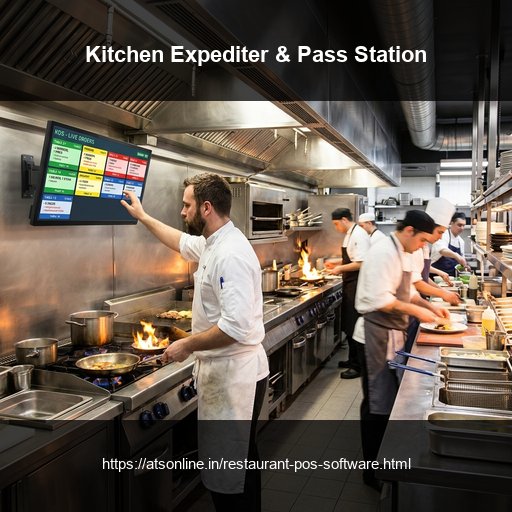
The Pass Station Bottleneck: Where Food Sits and Gets Cold
Ask any experienced executive chef where service breaks down during peak hours, and they will point directly to the kitchen pass station. Even when line cooks prepare dishes quickly, orders stall at the expediting counter due to poor coordination:
- The 'Missing Dish' Trap: The tandoor chef drops hot naans on the counter, but the curry won't be ready for another 7 minutes. By the time the full order is assembled, the breads are cold and rubbery.
- Food Runner Confusion: Waiters and food runners crowd the kitchen doorway, frantically asking: 'Is Table 9 ready? Who made the mutton korma? Where is the mocktail?'
- Delivery Rider Counter Crowding: Delivery riders from Swiggy and Zomato cluster around the billing desk, shouting order IDs at cashiers while food sits half-packed in plastic containers.
How Master Expediter Screens Synchronize Food Delivery
ATS Kitchen Display & Expediter System turns the pass station into an orderly, synchronized assembly line:
- Multi-Station Item Completion Matrix: The Master Expediter screen displays active orders with real-time status badges for each component station:
- *Tandoori Chicken:* [READY] (Green)
- *Dal Makhani:* [COOKING - 2 MINS] (Amber)
- *Garlic Naan:* [READY] (Green)
- 1-Tap 'Order Complete' Notification: When all stations mark their dishes finished, the expediter screen illuminates the full ticket green and sounds an audible chime.
- Waiter Smartwatch & Service Alerts: Completing an order triggers an instant wrist vibration on the assigned table captain's smartwatch: [Table 9 Complete - Pickup at Pass].
Customer-Facing and Rider Dispatch Boards
For takeaway and delivery operations, physical dispatch screens eliminate lobby congestion. ATS POS powers large customer and rider display monitors mounted above the collection counter:
- 'Preparing' Column: Displays order numbers currently cooking in the kitchen.
- 'Ready for Pickup' Column: Moves order numbers into a flashing green column with automated audio chimes (e.g., 'Token #142 Ready for Collection').
Delivery riders watch the screen from outside, stepping forward only when their bag is sealed and ready, eliminating lobby congestion and speeding up handoffs by over 40%.
Comparison Matrix
| Pass Station Process | Traditional Shouting & Paper Checks | ATS Digital Expediter & Dispatch System |
|---|---|---|
| Order Assembly Coordination | Expediter shouts across noisy cooking lines | Visual item-by-item status board across all stations |
| Food Temperature at Service | Dishes sit under heat lamps getting cold | Synchronized completion ensures food served piping hot |
| Food Runner Notification | Waiters hover around kitchen entrance | Instant silent smartwatch and screen alerts for runners |
| Delivery Rider Congestion | Riders shouting order IDs at cashiers | Automated ceiling TV dispatch board calling tokens |
| Kitchen Ticket Audit Trail | Lost or greasy paper receipts | 100% Timestamped prep and expediting logs per dish |
Frequently Asked Questions
What is the difference between a Kitchen Display System (KDS) and an Expediter Screen?
A KDS screen shows individual line cooks the dishes they need to prepare at their specific station. An Expediter screen aggregates all stations together at the final pass counter so the expediter knows when the entire meal is ready for assembly.
Can ATS Expediter screens run on standard TV monitors?
Yes! ATS Expediter software can run on commercial touch displays, all-in-one Android screens, or standard HDMI TVs connected via a mini PC or bump bar.
How does the system notify delivery riders that an order is ready?
Orders appear automatically on large ceiling-mounted TV dispatch screens in the collection lobby, and automated SMS/webhook alerts ping rider apps directly.
Does ATS track kitchen turnaround times for staff KPIs?
Yes. The system records the exact second an order is fired, when each station bumps their item, and when the expediter clears the ticket, generating detailed Kitchen Turnaround Time (KTT) reports.
Ready to Modernize Your Operations?
Transform your business with enterprise-grade restaurant POS solutions from ATS Online. Get real-time cloud control, rapid customer checkouts, automated recipe costing, and 100% operational uptime.
Or call our restaurant tech specialists directly at: +91-9810078010
Conclusion
The pass station is the final checkpoint of culinary quality and speed in every professional kitchen. By upgrading from chaotic shouting to ATS Online's digital Master Expediter screens and rider dispatch boards, restaurant teams eliminate packing mix-ups, speed up food delivery, and ensure every dish arrives piping hot.
Upgrade to ATS hospitality POS and automation solutions today. Visit ATS Cloud Restaurant POS, call us at +91-9810078010, or email ats.fnb@gmail.com for live product demonstrations.
Related Reading
- How Cloud Restaurant POS Software Drives Speed, Higher Margins, and Multi-Outlet Scale
- Smart Inventory and Recipe Costing: How Restaurants Stop Food Waste and Protect Margins
- Central Kitchen and Commissary Management: How Restaurant Chains Streamline Multi-Store Supply Chains
- Kitchen Display Systems (KDS) vs. Paper KOTs: Accelerating Kitchen Turnaround Time