Franchise Supply Chain: Inter-Store Transfers, Gate Passes & Transit Audits
October 8, 2026 in Food Cost & Inventory Management
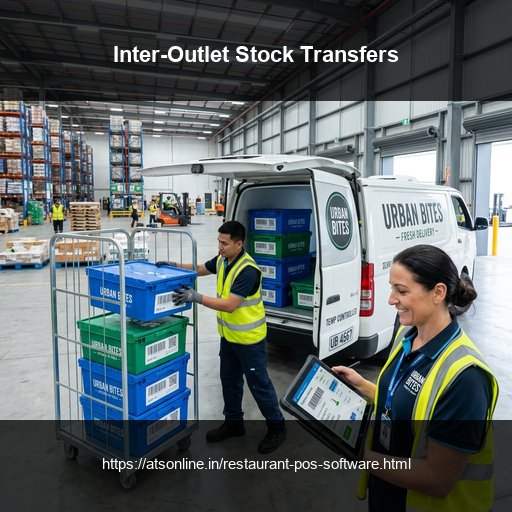
The Multi-Store Rebalancing Challenge: Surplus in Store A, Crisis in Store B
Multi-outlet restaurant chains constantly face uneven customer demand patterns across different neighborhoods. On a busy Saturday afternoon, an outlet in a commercial business district might experience slow foot traffic with surplus perishable dairy and bakery items, while an outlet in a major shopping mall experiences unexpected surge volume and faces imminent ingredient stockouts.
Without digitized transfer systems, moving ingredients between stores creates severe accounting chaos:
- Missing Stock Blame Games: Goods leave Store A without formalized dispatch manifests, allowing drivers or receiving staff to dispute missing crates.
- Corrupted Cost Center Accounting: Branch A purchased the inventory, but Branch B sold the finished dishes. Without automated inter-store cost reallocations, Branch A's food cost percentage appears artificially inflated while Branch B's margins appear artificially high.
- Transit Spoilage & Temperature Failure: Temperature-sensitive ingredients spoil during transit without temperature logs or delivery receipt timestamps.
How Digital Transfer Workflows Work in ATS Cloud POS
ATS Cloud Restaurant POS provides an airtight, multi-branch inventory transfer architecture:
- Digital Transfer Requisitions: When Store B notices a projected evening shortage, the store manager submits an inter-store transfer request directly on their POS terminal, visible instantly to regional supervisors.
- Goods Dispatch Note (GDN) & Digital Gate Pass: Store A approves the transfer, packs the crates, and generates a barcoded Goods Dispatch Note detailing item quantities, lot numbers, and dispatch timestamps.
- In-Transit Ledger Status: The central cloud ledger moves transferred stock from 'Store A On-Hand' to 'In-Transit'. Neither store can tamper with quantities while stock is en route.
- Goods Receipt Verification & Variance Reconciliation: When the delivery vehicle arrives at Store B, receiving staff verify quantities against the digital GDN. Any broken eggs or damaged boxes are logged as transit loss, and the receiving store's active stock balances update immediately.
Automated Inter-Store Transfer Pricing and Cost Center Debits
Franchise and corporate accounting requires strict financial separation between distinct operating units. ATS POS automatically calculates inter-unit transfer pricing based on standard weighted average cost (AVCO).
Upon receipt confirmation, the system creates balanced accounting ledger entries: crediting Branch A's raw material inventory asset account and debiting Branch B's cost center ledger. Multi-unit operators maintain crystal-clear individual branch P&L balance sheets without hours of manual end-of-month bookkeeping.
Comparison Matrix
| Transfer Function | Informal Phone Call & Paper Note | ATS Digitized Inter-Outlet Transfer |
|---|---|---|
| Transfer Request | Informal WhatsApp message (Frequently missed) | Structured digital transfer requisition with approval rules |
| Dispatch Authorization | No formal gate pass; high shrinkage risk | Barcoded Goods Dispatch Note (GDN) with digital timestamp |
| Stock Visibility in Transit | Stock vanishes from records until found | Dedicated 'In-Transit' cloud holding status |
| Transit Loss Responsibility | Endless finger-pointing between branch managers | Immediate transit variance logging upon destination receipt |
| Branch P&L Cost Allocation | Manual end-of-month accountant adjustments | Automated real-time inter-branch transfer ledger entries |
Frequently Asked Questions
Can an outlet manager request stock directly from another branch in ATS POS?
Yes. Store managers can view permitted regional branch stock levels and initiate an inter-outlet transfer request directly from their billing terminal.
How does the system prevent stock tampering during transit?
Transferred stock enters an 'In-Transit' status in the cloud database. It cannot be altered until the destination branch scans or verifies the items with a digital GRN.
Can the central office enforce transfer approvals before goods can leave?
Yes. Operations managers can configure mandatory head-office or regional supervisor approval thresholds before gate passes can be printed.
Does the system support inter-branch transfer of semi-finished preps?
Yes. Prepped gravies, marinated meats, and bakery doughs can be transferred with batch numbers, prep timestamps, and expiry dates.
Ready to Modernize Your Operations?
Transform your business with enterprise-grade restaurant POS solutions from ATS Online. Get real-time cloud control, rapid customer checkouts, automated recipe costing, and 100% operational uptime.
Or call our restaurant tech specialists directly at: +91-9810078010
Conclusion
In a fast-growing restaurant chain, letting surplus perishable stock spoil in one branch while another branch runs out of ingredients is an avoidable operational failure. With ATS Online's digitized inter-outlet stock transfer workflows, multi-store operators rebalance raw materials seamlessly, maintain strict transit audit trails, and eliminate branch-level stockouts.
Upgrade to ATS hospitality POS and automation solutions today. Visit ATS Cloud Restaurant POS, call us at +91-9810078010, or email ats.fnb@gmail.com for live product demonstrations.
Related Reading
- How Cloud Restaurant POS Software Drives Speed, Higher Margins, and Multi-Outlet Scale
- Smart Inventory and Recipe Costing: How Restaurants Stop Food Waste and Protect Margins
- Central Kitchen and Commissary Management: How Restaurant Chains Streamline Multi-Store Supply Chains
- Kitchen Display Systems (KDS) vs. Paper KOTs: Accelerating Kitchen Turnaround Time