POS Hardware Buying Guide: Selecting the Right Ticket Printer
June 26, 2026 in Event Solutions
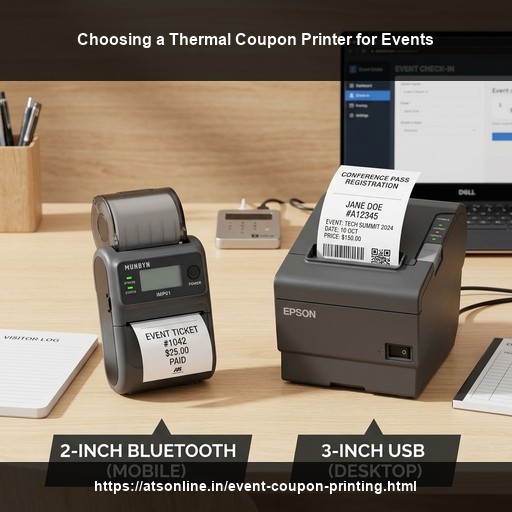
Deploying a cashless on-demand ticket system for a weekend festival or exhibition requires selecting the right POS hardware. While the billing software runs smoothly in your browser, the hardware terminal is responsible for the actual print speed and operational uptime. If a printer breaks down or prints slowly during peak evening hours, the queues back up and sales suffer. In this buying guide, we compare different types of direct thermal receipt printers to help you choose the best thermal coupon printer for events, fests, and temporary food courts.
1. Understanding Thermal Printing Technology
Thermal printers are the standard choice for retail, hospitality, and event billing. Unlike household inkjet or laser printers, they do not use ink cartridges, toners, or ribbons. Instead, they use a heated printhead to activate chemical dyes on specialized heat-sensitive paper rolls.
- Zero Operating Ink Cost: Since they do not require ink, you only need to purchase paper rolls. This makes the cost per printed coupon extremely low (less than ₹0.05 per slip).
- High Reliability: Thermal printers have very few moving parts. There are no print heads that clog or paper feed tracks that jam easily, making them perfect for dusty, high-density outdoor fests.
2. Print Width: 2-Inch (58mm) vs. 3-Inch (80mm)
Thermal receipt printers generally come in two standard widths. Choosing the right width depends on your event's billing detail needs:
A. 2-Inch (58mm) Printers
These are lightweight, compact, and highly economical devices. They are available as desktop units or handheld, battery-powered portable units.
- Best For: Value-based tokens (e.g., "₹50 Food Token"), simple gate entry passes, and single-item receipts.
- Pros: Very low initial purchase cost; compact size saves desk space; portable models can clip onto a cashier's belt.
- Cons: Narrow paper limits the layout. If you need to print a long list of items, the ticket becomes very long.
B. 3-Inch (80mm) Printers
These are standard heavy-duty desktop POS printers used in supermarkets and high-end restaurants.
- Best For: Detailed food court bills (listing multiple dishes across different stalls), large QR codes for scan-to-redeem validation, and sponsor logo displays.
- Pros: Wide layout allows clear, multi-column printouts; faster printing speeds; usually equipped with automatic paper cutters.
- Cons: Requires direct AC wall power; larger size; higher initial cost.
3. Connectivity Options: USB, Bluetooth, or LAN
Connecting your cashier's terminal (laptop, tablet, or phone) to the printer is a critical step in the setup. Here are the three common interfaces compared for thermal coupon printer for events setups:
A. USB Interface
A simple cable connection from the cashier's laptop/PC directly to the printer.
- Stability: Excellent. It is a wired connection, meaning zero wireless interference or dropouts.
- Best Setup: Fixed check-in desks using laptops or desktop computers.
B. Bluetooth Interface
A wireless connection popular for connecting handheld devices.
- Stability: Moderate. Bluetooth range is limited to about 10 meters and can be affected by physical blockages in crowded areas.
- Best Setup: Android tablets, mobile phones, or handheld POS terminals where cashiers move around.
C. LAN (Ethernet) Interface
The printer connects via network cable to a central Wi-Fi router. Cashier devices connect to the same router over Wi-Fi.
- Stability: High. It allows multiple cashier tablets or laptops to route print jobs to a single high-speed printer.
- Best Setup: Multi-lane central billing desks with fixed lanes.
4. Critical Features to Look For
When selecting a thermal coupon printer, ensure it has the following key specs:
- Print Speed: Look for desktop printers with speeds of at least 200 mm/sec to 250 mm/sec. Portable printers typically run slower (around 90 mm/sec).
- Auto-Cutter: Verify if the printer features a partial or full auto-cutter. Manually tearing coupons against a serrated edge takes cashiers an extra 2 seconds per guest, causing queues to slow down.
- ESC/POS Compatibility: Ensure the printer supports the standard ESC/POS command set. This allows ATS EventCouponPrint to communicate directly with the hardware, enabling faster raw text printing and cutter commands.
Conclusion: Choosing the Right Hardware Mix
For standard food fests and cultural events, a mix of heavy-duty 3-inch LAN/USB printers at the main check-in desks and portable 2-inch Bluetooth printers for mobile floor operators offers the best combination of speed, reliability, and mobility.
Ready to set up your event cashless system but unsure about hardware compatibility? Explore the EventCouponPrint software compatibility guide by Advance Technology Systems. Request a free hardware consultation today.
To speak directly with our POS hardware deployment team, call +91 9810078010 or email us at ats.fnb@gmail.com. We can help you configure the perfect setup.
Optimize your event checkouts with high-speed thermal coupon printers and smart billing software. Visit www.atsonline.in, call us at +91-9810078010, or email ats.fnb@gmail.com for hardware guides.