Key Takeaway (Direct Answer):
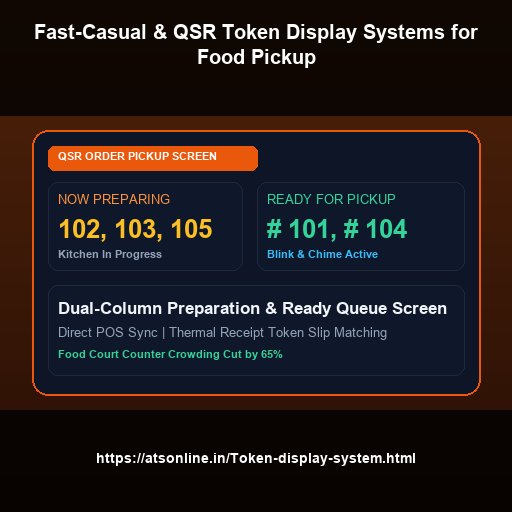
A QSR token display screen organizes food pickup by showing a clean, dual-column layout dividing orders into 'Now Preparing' and 'Ready for Pickup'. Powered by ATS Wireless Token Display (₹6,950/counter/year) running on standard Smart TVs in Google Chrome, it eliminates frantic counter crowding, prevents cold food pickups, and synchronizes seamlessly with POS billing and Kitchen Display Systems (KDS).
The Counter Chaos of Peak-Hour QSR & Food Court Dining
During peak lunchtime and weekend dinner rushes, Quick Service Restaurants (QSRs), burger joints, cafes, and multi-brand food courts face intense operational friction at the food collection window. Customers pay at the POS register, receive a printed receipt slip, and immediately congregate in front of the pickup counter, blocking other patrons from placing orders.
Kitchen staff shout out order numbers over the din of blenders, sizzling fryers, and customer conversations. Disgruntled diners continuously interrupt the expeditor asking, "Is order 142 ready yet?". Food sits under heat lamps losing freshness while the wrong customer accidentally grabs someone else's meal tray. Implementing a dedicated QSR Token Display System completely transforms this bottleneck.
The Dual-Column 'Preparing' vs 'Ready' Display Architecture
The global gold standard popularized by multinational chains like McDonald's and Shake Shack is the dual-column order status board. ATS brings this exact high-efficiency workflow to independent eateries and food court stalls using any budget Smart TV:
- Column 1: 'Now Preparing' (Amber/Blue): Displays orders currently being cooked in the kitchen. When a customer sees their receipt number in this column, they know their meal is being prepared and can relax at their dining table rather than blocking the pickup lane.
- Column 2: 'Ready for Pickup' (Vibrant Green): When the kitchen expeditor or burger line marks the order complete on their tablet or KDS, the number flashes to the 'Ready' column accompanied by a pleasant chime and human voice announcement: "Order 105 is ready for collection!".
- Audio Confirmation: Clear acoustic alerts prevent meals from sitting cold on the counter, guaranteeing peak food presentation, temperature, and crispness.
QSR Operational Metrics: Traditional Shouting vs. Smart TV Token Screen
| Operational Metric | Manual Shouting / Receipt Calling | ATS Smart TV QSR Token Screen |
|---|---|---|
| Counter Footprint Congestion | Crowded clump of 15–30 customers blocking pickup and register | Completely clear counter; diners wait comfortably at tables |
| Average Food Pickup Delay | 3.5 minutes (food sits cooling while staff repeatedly calls) | Under 25 seconds (instant visual flash + chime alerts diner) |
| Order Handover Accuracy | Frequent wrong-order grabs during busy rushes | 100% verification matching displayed token to printed slip |
| Expeditor Stress & Staff Fatigue | Exhausting, throat-straining shouting in noisy kitchen | Zero shouting; one-tap advance on tablet, phone, or POS |
| System Implementation Cost | Reputational damage and lost table turnover revenue | ₹6,950 per counter / year affordable cloud software |
Seamless Integration with Thermal Receipt Printers and POS
The ATS QSR Token Display System integrates smoothly into your existing dining infrastructure. When a cashier rings up an order on your POS terminal, the receipt printer prints a large, high-visibility token number at the top of the customer's thermal tax invoice or KOT slip.
The kitchen or expediting station uses any touch screen—such as a budget Android tablet, an existing billing PC, or a staff smartphone—to advance numbers as orders clear the grill or packaging station. For busy food courts with shared common seating areas, ATS even supports Self-Service QR Mobile Queue Tracking, allowing diners to stroll to other shops while tracking their food preparation status live on their personal smartphones.
Split-Screen Menu Specials and Upselling on the Same TV
Why waste prime dining room screen space solely on numbers? ATS enables QSR operators to split the TV screen into 60% order queue numbers and 40% mouth-watering high-definition digital menu signage. Run rotating video clips of your signature sizzlers, dessert combos, or seasonal beverage discounts directly to a captive audience of hungry diners, driving impulse re-orders and higher average check size.
Upgrade to ATS Wireless Token Display System
Turn any Smart TV or monitor into a high-visibility wireless token calling screen with natural human voice announcements, self-service QR queues, and multi-counter routing. Zero proprietary hardware required.
Frequently Asked Questions
Q: Can the screen display both 'Preparing' and 'Ready' columns?
A: Yes! The ATS QSR display mode automatically organizes orders into distinct, high-contrast 'Preparing' and 'Ready for Pickup' columns with customizable colors and animations.
Q: How do kitchen cooks change an order from Preparing to Ready?
A: Kitchen staff or expeditors can use any smartphone, tablet, or touch monitor mounted in the kitchen. Tapping an order number instantly moves it to the 'Ready' column and plays the audio chime on the dining TV.
Q: Can this system work in a shared mall food court?
A: Absolutely. It is ideal for food courts. Stalls can display tokens on dedicated TVs above their counter, and customers can even track order readiness on their mobile phones via QR code while browsing nearby shops.
Q: What happens if an order is collected?
A: The staff member simply taps 'Complete' or clears the number from their keypad screen, which smoothly removes it from the TV display after a configurable grace period.
Q: What is the cost for a fast-food outlet?
A: The ATS Wireless Token Display System software costs just ₹6,950 per counter per year, making it accessible for single-outlet cafes as well as multi-unit restaurant chains.
For live demos, multi-branch deployments, or enterprise custom setups, contact Advance Technology Systems at +91-9810078010 or email ats.fnb@gmail.com.