Technology Evaluation: Architecture, Security, Cost & Scalability Compared
October 8, 2026 in POS Architecture & Reliability
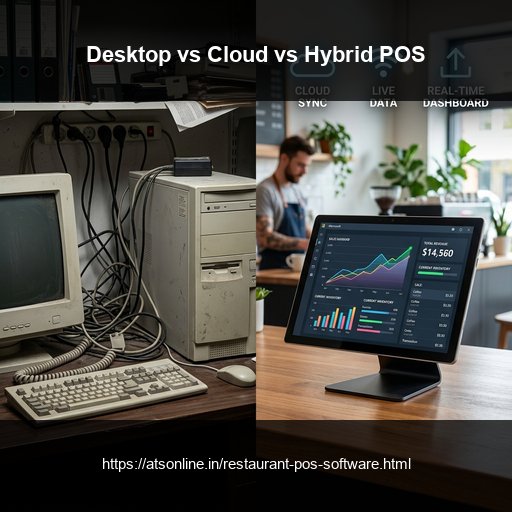
Understanding the Evolution of Restaurant POS Architectures
Choosing the architectural foundation of your restaurant POS system is one of the most critical technology decisions an F&B business will ever make. The wrong choice can lead to lost rush-hour revenue during network outages, endless spreadsheet reconciliation headaches, or costly software migrations down the road.
Over the past two decades, restaurant point-of-sale systems have evolved through three distinct technology generations:
1. First Generation: On-Premise Desktop POS (1995–2015): Installed directly on a local hard drive. Extremely fast and offline-reliable, but data remains locked inside the four walls of the restaurant. 2. Second Generation: Pure Cloud Web Apps (2015–2022): Hosted entirely in remote cloud servers and accessed via web browsers. Excellent for mobile reporting, but completely vulnerable to internet broadband failures. 3. Third Generation: Modern Hybrid-Cloud POS (2022–Present): A smart fusion architecture that stores transactional data locally for 100% offline uptime while syncing continuously with central cloud servers.
Detailed Architectural Breakdown: Strengths and Weaknesses
To determine the right fit for your food business, let us examine how each architecture behaves under real-world restaurant pressures:
- On-Premise Desktop Systems: While they never freeze due to Wi-Fi issues, their drawbacks are severe. Owners cannot check sales from home, recipe updates must be typed manually on every register, and a hard disk failure can permanently destroy years of tax and sales books.
- Pure Cloud Systems: Highly popular due to sleek design and instant phone apps. However, during dinner rushes when dozens of tables order simultaneously, browser latency can cause sluggish typing. Worse, if your ISP experiences fiber cuts, the entire restaurant stops functioning.
- ATS Hybrid Architecture: ATS Cloud Restaurant POS executes all mission-critical operations—order entry, KOT printing, bill settlement, and cash drawer management—against local encrypted storage. Once orders clear, background sync pipelines upload data to your cloud enterprise console silently.
Total Cost of Ownership (TCO) and Long-Term Scalability
Beyond day-to-day reliability, total cost of ownership differs dramatically across the three models. Legacy systems carry hefty upfront licensing fees and expensive annual maintenance contracts (AMCs). Pure cloud systems offer low entry costs but often introduce predatory transaction percentage fees or strict hardware requirements.
Hybrid POS provides the most cost-effective scalability: affordable transparent subscription tiers, freedom to choose your own hardware, and zero third-party commission penalties on in-house dining bills.
Comparison Matrix
| Feature / Dimension | Legacy Desktop POS | Pure Cloud Browser POS | ATS Hybrid-Cloud POS |
|---|---|---|---|
| Billing During Internet Outage | 100% Operational | Completely down / Inactive | 100% Operational (Local caching) |
| Real-Time Remote Analytics | None (Must visit physical outlet) | Instant smartphone access | Instant smartphone access |
| Local Network KOT Routing | Direct local printing | Requires active internet pipe | Direct local LAN routing |
| Multi-Outlet Management | Manual Excel consolidation | Central cloud dashboard | Central cloud push & consolidated P&L |
| Hardware Dependency | Heavy proprietary PCs | Tablets / Web browsers | Flexible (Windows, Android, Tablets) |
| Automatic Data Backup | Manual pen-drive backups | Automatic cloud backup | Automatic multi-tier cloud backup |
Frequently Asked Questions
Which POS architecture is best for a busy multi-outlet restaurant?
Hybrid POS architecture is overwhelmingly the best choice. It provides the multi-outlet cloud controls and mobile reporting of cloud systems while protecting each outlet from internet disruptions through local offline billing.
Why do pure cloud POS systems freeze during busy shifts?
Pure cloud systems require every single screen touch, item click, and check reprint to round-trip to a remote cloud server. When local Wi-Fi lags or network packets drop, the screen freezes waiting for server confirmation.
Can I switch from a legacy desktop system to ATS Hybrid POS without losing history?
Yes. ATS provides seamless migration utilities to import your historic menu master, customer database, and vendor profiles in clean Excel formats.
How often does ATS Hybrid POS sync with the cloud?
ATS POS syncs continuously in near real-time (every few seconds) whenever an internet connection is available, and queues sync packets instantly during drops.
Ready to Modernize Your Operations?
Transform your business with enterprise-grade restaurant POS solutions from ATS Online. Get real-time cloud control, rapid customer checkouts, automated recipe costing, and 100% operational uptime.
Or call our restaurant tech specialists directly at: +91-9810078010
Conclusion
While legacy desktop systems lack remote access and pure cloud web apps risk fatal internet outages, hybrid architecture offers the definitive F&B operational solution. By combining bulletproof local offline billing with instantaneous cloud analytics, ATS Online provides the optimal technology foundation for scaling restaurants.
Upgrade to ATS hospitality POS and automation solutions today. Visit ATS Cloud Restaurant POS, call us at +91-9810078010, or email ats.fnb@gmail.com for live product demonstrations.
Related Reading
- How Cloud Restaurant POS Software Drives Speed, Higher Margins, and Multi-Outlet Scale
- How Direct Swiggy and Zomato POS Integration Eliminates Tablet Chaos and Order Errors
- Smart Inventory and Recipe Costing: How Restaurants Stop Food Waste and Protect Margins
- Kitchen Display Systems (KDS) vs. Paper KOTs: Accelerating Kitchen Turnaround Time