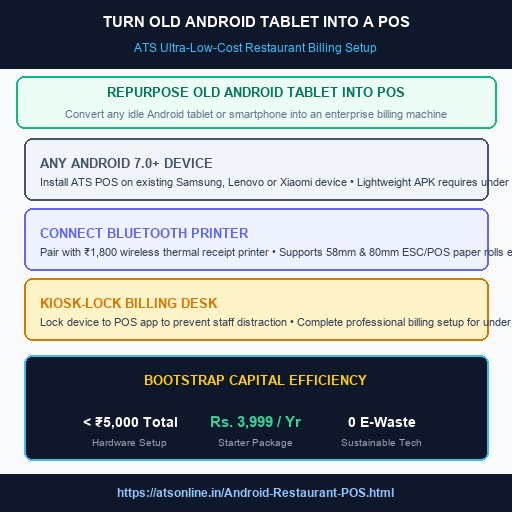
ATS Android Restaurant POS Architecture (Starts from Rs. 3,999 onwards)
Executive Summary (Direct Answer):
Repurposing an old Android tablet or smartphone into a commercial restaurant POS involves installing a lightweight native billing APK, locking the device into kiosk mode, and pairing it with a budget-friendly wireless Bluetooth thermal receipt printer. Using ATS Android Restaurant POS (starting from Rs. 3,999 onwards), bootstrapped food entrepreneurs, chai stalls, and artisan bakeries build a complete, professional, GST-compliant billing counter for under ₹5,000 total hardware investment without buying expensive desktop computers.
The Capital Trap for New Food Startups: Don't Waste ₹50,000 on Hardware
When launching a new cafe, cloud kitchen, bakery kiosk, or street food stall, startup capital is precious. Every rupee spent on non-cooking hardware is money diverted away from ingredient quality, store interior ambiance, and local customer marketing. Yet, many first-time restaurant owners are misled into believing they must purchase expensive desktop computers, heavy all-in-one touch terminals, and complex server setups costing ₹45,000 to ₹70,000.
In reality, millions of households and small business owners have idle Android tablets or older smartphones lying in office drawers. Because modern Android devices pack quad-core processors, vivid capacitive touchscreens, and Bluetooth/Wi-Fi chips that far exceed the processing needs of a restaurant cash register, converting an existing tablet into a dedicated restaurant POS station is the smartest financial move a bootstrapped founder can make.
Step-by-Step Guide: Converting an Android Device into a POS Station
Setting up ATS Android Restaurant POS on an existing Android tablet takes under 10 minutes:
- Verify Minimum Device Specifications: Any smartphone or tablet running Android OS 7.0 (Nougat) or higher with at least 1GB of RAM and 16GB of storage is fully supported. Brands like Samsung, Lenovo, Xiaomi, and Realme work effortlessly.
- Download and Install ATS POS APK: The lightweight ATS application requires under 25MB of storage, ensuring lightning-fast operation without lag or battery drain.
- Enable Android Kiosk Lock Mode: Use native screen pinning or Android enterprise kiosk settings to lock the tablet to the ATS POS app, preventing cashiers from browsing YouTube, social media, or changing device settings.
- Pair a Wireless Thermal Printer: Connect an inexpensive 58mm or 80mm Bluetooth thermal receipt printer (available online for ₹1,500 to ₹2,500). ATS POS recognizes the printer instantly with native ESC/POS drivers.
- Mount on an Acrylic Stand: Place the tablet on a sturdy ₹500 desktop swivel stand on your cash counter, creating a sleek, minimalist, modern billing desk.
Capital Investment Breakdown: Desktop PC vs. Repurposed Android Tablet
| Hardware Component | Traditional Desktop PC Billing Setup | Repurposed Android Tablet Setup |
|---|---|---|
| Core Computing Terminal | ₹25,000 - ₹35,000 (Desktop CPU + Monitor) | ₹0 (Existing Android tablet / phone) |
| Thermal Receipt Printer | ₹7,000 - ₹12,000 (Bulky 80mm wired printer) | ₹1,800 - ₹2,500 (Portable 58mm Bluetooth) |
| Power Backup / Inverter | ₹5,000 - ₹8,000 (Desktop UPS inverter) | ₹0 (Built-in tablet battery + ₹1,000 Power bank) |
| Total Upfront Hardware Cost | ₹37,000 - ₹55,000+ | Under ₹5,000 Total Out-of-Pocket |
| Software Package Price | Expensive enterprise desktop software | Budget ATS App starting from Rs. 3,999 onwards |
Eco-Friendly Technology: Reducing E-Waste While Maximizing Speed
Repurposing consumer electronics isn't just financially prudent—it is an environmentally responsible business choice. Electronic waste is a rapidly growing global environmental crisis. Giving a second life to an older tablet keeps functional silicon out of landfills while providing your food business with a modern touch-screen interface that impresses customers.
With ATS Android Restaurant POS running on your tablet, you enjoy all the advanced capabilities of high-end restaurant chains: split billing, recipe stock depletion, table layout mapping, dynamic UPI QR generation, and daily WhatsApp sales reporting, all while keeping your fixed overhead razor-thin.
Ready to Upgrade to Mobile Android Restaurant Billing?
Transform smartphones, tablets, or handheld terminals into powerful restaurant billing machines with offline resilience, Bluetooth printing, and dynamic UPI starting from Rs. 3,999 onwards.